Aqrobat: QR codes, in character
Published
A QR code you can copy and paste like text, and still scan.
Aqrobat makes QR codes out of text. Every dark square of a standard QR code becomes a character you pick, and every light square becomes a blank. The result isn’t a picture of a QR code. It’s text: you can select it, copy it, and paste it into an email, a chat, or a document, and a phone camera still reads it.
Drawing a scannable QR code with text is the easy part. Making the code survive a paste into another app is the hard part, and that’s what Aqrobat does.
- Free, and it stays on your device. No account, no server, no ads, and no tracking. Codes are made in your browser, and nothing you type is sent anywhere.
- It knows where the code is going. Tell it the destination (Gmail, Slack, Google Docs, GitHub, Notion, or one of a few others), and it copies the code in the shape that app keeps: formatted text, plain emoji, a code block, or an image.
- The characters are yours. Emoji squares in six colors, full blocks,
#, any emoji, or several at once. The corner markers and the light squares can get characters of their own, too. Want a rocket ship emoji (🚀) QR code, or a smiley face AND a hash character (🙂#), or practically any other combination of text, emoji, etc.? You can do it with Aqrobat. - Your link stays exact. Up to 1,024 bytes, never shortened. If it doesn’t fit, Aqrobat says so instead of quietly trimming it.
- More than a website. A Chrome extension puts a code straight into the field you’re typing in, and there’s an offline page and a command-line tool.
See it work
A 19-second recording of the real page. A link goes in, the grapes get black corners and white blanks, the emoji picker finds a black heart, the corner frames turn red, and one click copies the code for Slack.

Why I built it
Can text itself be a QR code?
Not just a picture of one. Actual characters you can select and copy.
The answer is yes, and it has been for a while. Terminal tools have printed QR codes with block characters for years, and people have built them out of emoji, too. The catch is that those codes are made for one place. A terminal has a monospace font and keeps every space. Paste the same code into an email or a chat, and the app applies its own formatting and breaks the code: it swaps the font, collapses the spaces, stretches the lines, or wraps the rows. The code that looked perfect in the generator doesn’t scan on the other side.
So, yes, text itself can be assembled into a readable QR code, at least in the application that generates the code. But whether the code survives a paste into a different app is a separate question, and this project is my attempt to answer it.
Introducing… Aqrobat: QR codes that survive the paste!
Make one
This is Aqrobat’s real encoder, running in this page. Type a link, pick your characters, and point your phone’s camera at the code.
This demo needs JavaScript. You can make a code on Aqrobat’s site instead.
Every dark square is one of your characters. Type several, like 🍇🍓🫐, and they take turns in the order you typed them. Every light square is a blank: ⬜ for the squares, and a mostly white ▫️ for other emoji. There’s no solid QR code hiding behind the characters, either. What you see is all a camera gets.
The line under the code says what’s known about that exact choice: whether it has scanned from Gmail on a real phone, how it did in a Gmail simulator calibrated on real phone scans, or that nobody has tried it yet. On the site, every new code starts out marked Untested for the same reason. Fonts, screens, and phones vary, so you scan the pasted result before you rely on it.
What apps do to your code
A QR code needs every row the same width and every square roughly square. Apps don’t agree on fonts, line spacing, or what to keep from the clipboard, so a code that leaves the generator in perfect shape can arrive in pieces. Here’s the same link drawn with full blocks and with emoji squares. Pick what the app does:
This demo needs JavaScript.
To find out what actually survives, I built a test lab. It pastes codes with the real clipboard into eight editors (a plain text box, a bare editable page, ProseMirror, Tiptap, Quill, Lexical, CKEditor 5, and Slate, the engines behind many of the web’s text fields) using fonts and spacing like Gmail’s, Google Docs’, Slack’s, Discord’s, and Notion’s. Then two software decoders read every result. After 3,720 pastes, a few rules held up:
- Emoji squares survive almost anywhere. In all 1,984 emoji-square cases, every row arrived intact. Every emoji in a font is the same width, so the rows line up whatever font the app picks.
- Loose line spacing beats them. At Notion-style 1.5 spacing, emoji squares passed 11 of 36 cases, so Aqrobat sends Notion a code block instead.
- Letters and blocks need a monospace font. Full blocks passed in code blocks and failed in all 192 rich-text cases, where a block and a space are different widths.
- Formatted text depends on the editor. A bare editable page kept its styles, and the code read in all 24 cases. Lexical, CKEditor, and Slate stripped them in all 24.
Those are simulations of the apps’ styles, not the apps themselves, and software reading a screenshot isn’t a phone scan. But they decided what each destination gets:
| Destination | Pastes as | Tested characters |
|---|---|---|
| Gmail, Outlook, Word | Formatted text | Emoji squares |
| Google Docs, Apple Notes, Slack, Discord, plain text | Plain text | Emoji squares |
| GitHub, Markdown | Code block | Full blocks |
| Notion | Code-block text | Full blocks |
| Anywhere else | Image | Any |
Every format carries the characters you picked. The destination only decides the wrapper.
Gmail, specifically
On a phone, Gmail pastes plain text and then changes it in two ways that matter for a QR code:
- Runs of spaces collapse to one. A letter code uses spaces for its light squares, so it loses its shape. No plain-text layout of letters survived this in testing.
- Emoji become Google’s own emoji images. They all come out the same size, which keeps the rows lined up. But Gmail draws ⬜ as a light gray tile about as bright as most emoji, so a camera can’t tell grapes from the background.
I tested this the only way that counts: I sent codes through Gmail from my phone and scanned them off a bigger screen. Black squares scanned. Grapes and smileys didn’t.
So now every emoji other than the squares gets the mostly white ▫️ for its light squares and solid ⬛ corner markers, which are the first thing a camera looks for. In a Gmail simulator calibrated on those phone results, grapes went from 0 of 12 camera trials to 9. Then the real test: on October 29, 2026, grape and black-heart codes laid out that way scanned from Gmail on my phone. Smileys still don’t, because they’re mostly light, so the page warns you before you pick one.
A code in Gmail also reads best on a wide screen, like a laptop or a tablet. On a phone’s screen, it gets squeezed too small. For phone to phone, send the image.
Oh, and one bug I didn’t see coming. On my Samsung phone, copying a code with emoji light squares said “Copied.” and put nothing on the clipboard. The formatted copy was about 860 KB, Android refuses clipboard writes near 1 MB, and Chrome reports success anyway. On Android, Aqrobat now copies big codes as plain text, which is what Gmail on a phone uses anyway, and it tells you so.
What’s already out there
Text QR codes aren’t new, and Aqrobat isn’t the first tool to make them out of emoji. Here’s what I found, starting with the closest:
| Project | What it does | How it compares |
|---|---|---|
| OshiQR | A free web generator that runs in your browser. Makes codes from emoji (any emoji for the dark and light squares), half blocks, or full blocks, and copies them as text or saves an image. | The closest match by far. It notes that text codes need a monospace font, and it suggests saving an image for wider compatibility. Aqrobat shapes each copy for the app it’s going to instead. |
| Terence Eden’s emoji QR code (2020) | A blog experiment: ⬛ and ⬜ emoji, with CSS removing the gaps between them. | It scanned on his devices, but he found it fragile anywhere he couldn’t control the layout. That layout is the part Aqrobat works on. |
| qrencode and qrcode-terminal | Print QR codes with block characters in a terminal. | Built for a monospace terminal, and great there. Not meant for email or chat. |
| MojiQR (iPhone) | Draws QR-style codes with your own words and saves them as images. | Image output, and its developer says not every code will scan. |
| Picture QR codes: QArt codes (2012), logo generators, and AI art codes such as QR Code Monster | Put a picture into or around a working QR code. | Images, not text. The AI models’ own pages warn that not every output scans. |
I haven’t tested the other tools’ claims myself. The descriptions above are what each project says about itself, as of October 2026.
What Aqrobat does differently
- A format for each app, chosen by testing. Formatted text for Gmail, Outlook, and Word; emoji squares for Google Docs, Apple Notes, Slack, and Discord; a code block for GitHub, Markdown, and Notion; and an image for everything else.
- Evidence, kept separate. Decoding in software, surviving a paste, and scanning on a phone are three different claims. Aqrobat never says a code scans until that exact output has been scanned.
- Parts. The corner frames, the corner centers, and the light squares can each get their own character, and the page warns you when a choice is likely to stop a camera.
- An extension that measures the field. It reads the font of the field you’re typing in and packs the characters to keep the squares square, so the code skips the clipboard entirely. Your draft is kept, selected text is never replaced, and Undo removes the code.
- Recipes. A small JSON file stores the exact input and every setting, so the same code can be rebuilt anywhere, character for character.
- The same core everywhere. The site, the offline page, the extension, and the command-line tool all run the same code, with no runtime dependencies.
How to use it
On the web
- Open Aqrobat.
- Type a link or some text.
- Pick the characters that draw the dark squares.
- Pick where the code will go, then press Copy.
- Paste it, and scan the pasted result with your phone before you send it.
It works offline, too. The offline page is the whole generator in one HTML file that opens straight from your disk.
In Chrome
The extension isn’t in the Chrome Web Store, so it installs by hand:
- Download and unzip the extension.
- Open
chrome://extensionsand turn on Developer mode. - Choose Load unpacked and pick the unzipped folder.
Then choose Aqrobat in the toolbar to make a code for the page you’re on, or right-click a link or a selection. Want to try insertion first? The practice page needs no install. The extension asks only for activeTab, scripting, storage, and contextMenus, so it can reach a page only after you click it there.
From the command line
With Node 22 or newer, from a clone of the repository:
node bin/aqrobat.mjs 'https://example.com' --format tiles
node bin/aqrobat.mjs 'https://example.com' --glyph '🍇' --format paste
node bin/aqrobat.mjs 'https://example.com' --format recipe --out qr.json
It has no dependencies, and it never overwrites a file.
How it’s built
Aqrobat is plain JavaScript: ES modules, HTML, and CSS, with no framework and no runtime dependencies. One core runs in three places: the website, the Chrome extension, and Node. Here’s the stack, and why each piece is there:
| Piece | Built with | Why |
|---|---|---|
| Core | JavaScript ES modules, no runtime dependencies | Runs unchanged in a page, an extension, and Node. |
| QR encoding | Project Nayuki’s QR Code generator (MIT), vendored | A proven, standard encoder. Aqrobat changes how the grid is drawn, never the code itself. |
| Characters | Intl.Segmenter | One emoji can be several code points (flags, skin tones, families), and each still has to fill one square. |
| Square cells | Canvas text measurement | Fonts disagree about widths, so Aqrobat measures them instead of guessing. |
| Website | Static HTML, CSS, and ES modules on GitHub Pages | No server and no account, and nothing you type leaves your browser. |
| Copying | The async Clipboard API, with HTML and plain text in one copy | Rich editors take the formatting, and plain-text apps take the characters. |
| Extension | Chrome Manifest V3, with activeTab, scripting, storage, and contextMenus | The fewest permissions that work. |
| Command line | Node 22 | Scripts can make codes and recipes without a browser. |
| Emoji picker | Unicode 16.0’s emoji list and CLDR 46’s keywords, built into the page | Search by name, like a phone keyboard, with no network call. |
| Tests | Node’s test runner, Playwright driving Chrome, and the ZXing and jsQR decoders | Software checks every change. A phone has the final word. |
No framework, no dependencies. The page is one screen with a few dozen controls, and the core has to run in a browser tab, an extension, and a terminal. Plain ES modules run in all three as they are. Nothing gets installed when you use Aqrobat, there’s nothing to keep up to date, and the whole generator fits in one HTML file that works offline. The only build step is a short Node script that inlines the modules into that file and packs the extension.
A standard encoder, unchanged. QR encoding is a solved problem, and every phone camera already reads standard codes. Aqrobat uses Project Nayuki’s encoder as published, keeps its license, and only changes how the finished grid is drawn. Text outside ASCII goes in as UTF-8, marked with the QR standard’s ECI 26, so an emoji in your link comes back as the same emoji.
Deterministic on purpose. The same input and settings always give the same code, character for character. That’s what makes recipes work, and it’s what makes the code testable: a test can rebuild any code and compare it exactly.
The extension edits like you do. It inserts a code through the browser’s own editing commands instead of rewriting the page, so the editor sees an ordinary edit, and Undo takes it back out. With activeTab, it can’t touch a page until you click it there.
Tested in software, settled on a phone. Unit tests run on Node’s built-in test runner. Browser tests use Playwright to drive Chrome, copy every destination’s format, and read the rendered codes with ZXing and jsQR. The paste lab uses the same setup with the real clipboard and eight editor engines. The Gmail simulator draws a pasted code the way Gmail does (Arial, Google’s Noto emoji, and collapsed spaces), then runs 12 camera-like trials on it, scaled, blurred, noisy, and tilted. Its results match all seven codes I’ve sent through Gmail and tried with my phone. Software can say a code is likely to work, but only a phone can say it does.
Even the demo at the top is the real page: Playwright records it frame by frame, and ffmpeg turns the frames into the GIF. Aqrobat is MIT licensed, and GitHub Actions runs the unit tests and a Prettier format check on every pull request.
What it can’t do (yet)
- Wrapped rows break a code. Narrow windows and long links, which make bigger codes, are the usual causes. Make the font smaller, widen the window, or shorten the link.
- Light emoji don’t scan. 🙂 and 🐱 are mostly light, and the page warns you about them.
- Loose line spacing hurts emoji squares, and editors that strip formatting lose formatted text’s layout.
- Dark-mode code blocks invert the code: light blocks on a dark background, which some phone readers won’t accept.
- It isn’t secret. A character QR code is decoration, not encryption. Anyone with a camera can read it.
- Real-app testing is still thin. Gmail has real phone scans. Google Docs, Slack, Discord, Notion, Outlook, and Word have been tested only in simulation so far.
A side quest: can prose be a QR code?
There’s a harder version of the original question: Can ordinary, readable prose, words you can select and copy, also be a QR code that a phone scans?
Short answer: yes, but not invisibly. Prose scanned when each letter was set in one of two tones, dark or light, so the tones draw the code. A 1,114-word passage in 8-point Impact on a Letter page survived a copy and paste from one Word document into another, and it scanned easily.
Early results: if a human can’t easily tell that something is a QR code, then a machine can’t, either.
I’m still trying to find a way to hide a QR code in natural-language prose, and I will update Aqrobat and this blog post as I discover more. Stay tuned!
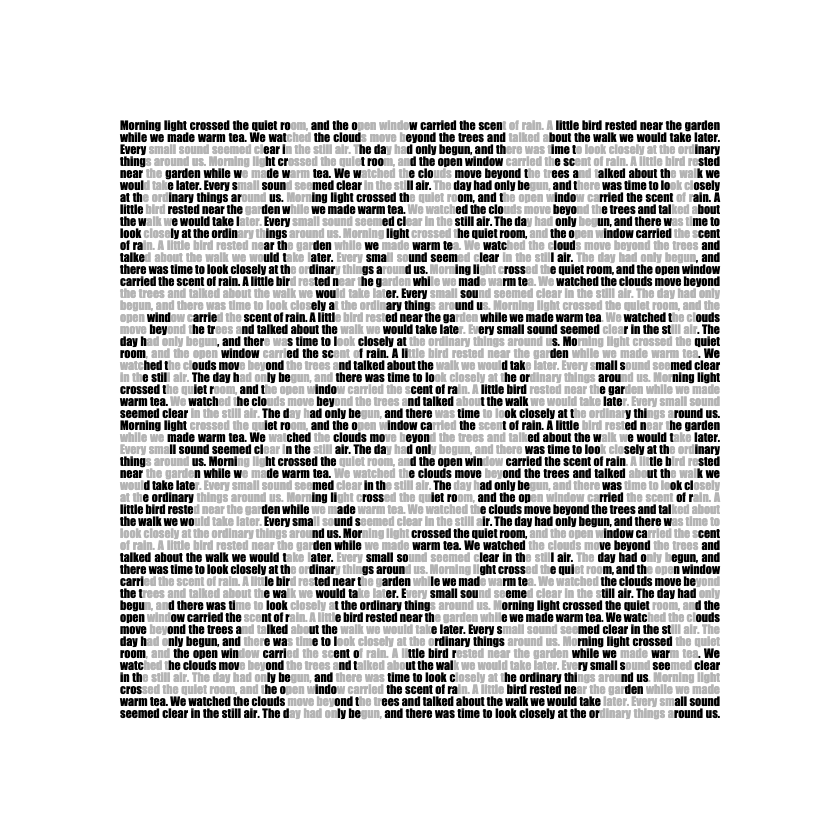
Prose that looks ordinary never scanned. Uniform text didn’t, words arranged on a QR grid didn’t, and heavy against regular weight didn’t. For fixed text where each letter can only be bold or regular, the error correction math rules it out: the best arrangement left at least 42 wrong codewords in a block that can repair 14.
In other words, a camera can’t find a QR code that a person can’t see. FOR NOW.
I’m still not convinced that it’s impossible to hide a QR code in a block of text.
The full notes, with the pages that scanned and the ones that didn’t, are on the research page.