mermaidify: a whiteboard that writes Mermaid
Published
Sketch a flowchart with your finger, and get code you can paste anywhere – with no AI, no account, and no upload.
mermaidify is a drawing pad for diagrams. You sketch a flowchart or a state diagram with a finger, a stylus, or a mouse, press Mermaidify, and it writes the Mermaid code for what you drew: plain text that GitHub, GitLab, Notion, Obsidian, and most docs tools draw as a clean diagram.
There are already tools that turn a picture of a diagram into code. mermaidify does it differently:
- No AI, no server, no account. It reads your strokes with geometry, right in your browser, in about three thousandths of a second per drawing. Nothing you draw leaves your device, and once you’ve opened it, it works offline.
- It reads as you draw. Hold still at the end of a shape, and it snaps clean, so you see what it read before you ever ask for the code.
- The diagram stays yours to edit. Name shapes and arrows, change a shape’s look, restyle a line, or edit the code by hand, then copy it, save it as SVG or PNG, or embed it in a web page.
- It’s measured, not just demoed. On 300 hand-drawn flowcharts it was never tuned on, it finds 95% of the shapes and reads 82% of the arrows right.
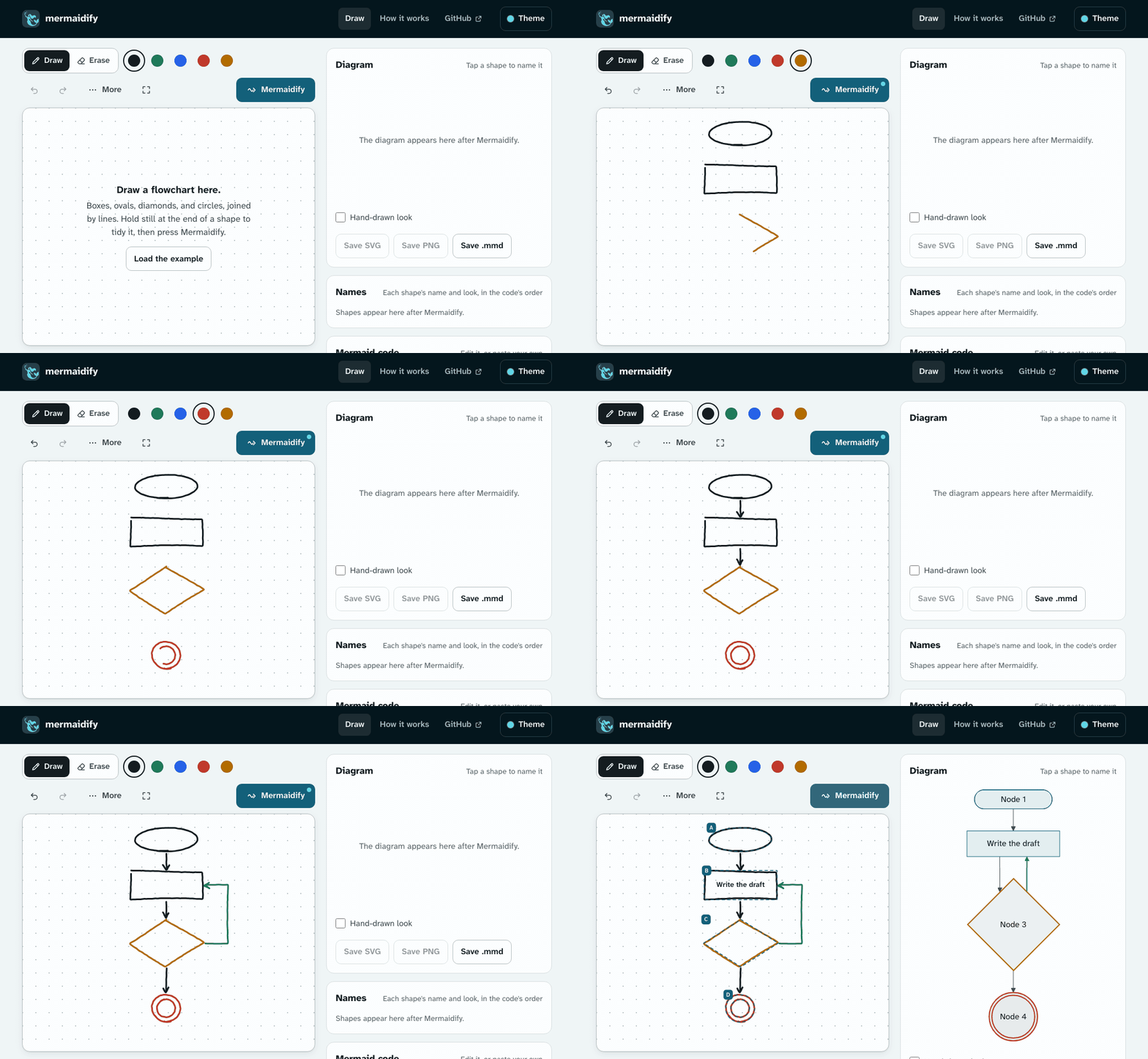
Try it right here
This is mermaidify’s real reader, the same code the app runs, working inside this page. Draw two boxes and an arrow between them, or load the example. Hold still for half a second at the end of a shape or an arrow, and it snaps clean.
This demo needs JavaScript. You can draw in the app instead.
The full app at ryanjosephkamp.github.io/mermaidify adds everything this little pad leaves out: names, colors, choosing and moving strokes, templates, zooming, and saving.
Why I built it
Mermaid is plain text, it lives right next to the code it describes, and nearly every tool I use can draw it.
But typing Mermaid is a different job from thinking in pictures, and pecking away at a keyboard is nowhere near as fun as doodling a diagram on a page. You stop drawing, start naming nodes A, B, and C, look up which brackets make a diamond, and lose the thread of what you were working out.
The AI tools that turn a photo of a whiteboard into a diagram get surprisingly close, but they want an upload, an account, or a subscription; they take seconds rather than milliseconds; and an AI model’s answer can change from one run to the next. I wanted something that reads my drawing the same way every time, shows me what it read while I’m still drawing, runs on a phone with no connection, and costs nothing.
So I built mermaidify: a whiteboard that writes Mermaid.
What’s already out there
Turning a sketch into a diagram isn’t a new idea, and some of the tools that do it are very good. They fall into three groups.
AI tools that read a photo or a prompt
Mermaid AI, from the team behind Mermaid, takes a prompt, a document, or an image of a diagram and gives you Mermaid code. Eraser imports a photo of a hand-drawn diagram, Lucidchart rebuilds an uploaded image as editable shapes, and Excalidraw turns text into a diagram. And of course, you can hand a photo to ChatGPT, Claude, or Gemini and ask for Mermaid.
They’re impressive, but they all run on someone else’s model. That means an account, an upload, and usually credits: as of October 2026, Mermaid AI’s free plan comes with 15 AI credits, Eraser’s with 3, and Excalidraw’s with 10 requests a day. They read a finished picture rather than ink as you draw it. And none of the vendor pages I read says how often they get a diagram right.
Note apps that tidy your shapes
Notability, Goodnotes, Apple Notes, Samsung Notes, and Concepts all turn a rough circle into a clean one, most of them when you hold your pen still at the end. (mermaidify borrows that gesture.) But a clean circle is all you get: the app doesn’t know which shapes your lines connect, so there’s no diagram to export.
Two come closer. Microsoft’s Ink to Shape turns a line drawn between two shapes into a real connector. And MyScript reads a whole hand-drawn diagram, handwriting included, into a graph of nodes and edges. Neither writes Mermaid, and MyScript’s engine is a commercial SDK.
Research
Reading hand-drawn flowcharts from pen strokes has been studied for over a decade, on datasets like FC_A, FC_B, and Google’s DIDI. The best published model I found, Arrow R-CNN, is a neural network that gets 83.9% of DIDI’s text-free diagrams exactly right. That’s better than mermaidify’s 67%, though not a head-to-head number: it was trained on DIDI, scored a little more loosely, and timed on a data-center GPU. A few open-source projects pair a drawing canvas with a vision model, such as Sketch2Graphviz, which needs a server with a large GPU.
Where mermaidify fits
As far as I could find, mermaidify is the only tool that reads live ink into shapes and arrows and writes Mermaid entirely in the browser, with no model, no server, no account, and no key. It’s free, it works offline, it reads state diagrams as well as flowcharts, and it publishes its accuracy on drawings it was never tuned on.
It’s also weaker in certain areas. It doesn’t read handwriting, so you type the names. It can’t read a photo of a whiteboard you’ve already drawn on. And a well-trained neural network still reads more drawings. The trade: mermaidify does it in a few thousandths of a second, on any phone, for free, and gives the same answer every time.
What it reads
mermaidify reads two kinds of diagram, flowcharts and state diagrams, from the same drawing.
- Shapes: boxes, ovals, circles, diamonds, hexagons, parallelograms, trapezoids, triangles, boxes in boxes, and double circles, each as the Mermaid shape it looks like. A shape drawn around other shapes is a group.
- Arrows: a line with its head drawn as a hook, a V, a triangle, or a filled knot, at either end or both, in one stroke or apart. Curved lines read too, a dashed line is dotted in Mermaid, and a line drawn twice over is thick.
- State diagrams: a small filled dot is a start, a ring around a dot is an end, a diamond is a choice, and a shape around shapes is a composite state.
- Any order, any number of strokes. Draw the arrows first if you like, or a box in four separate lines. On 300 drawings, each read in five shuffled orders, 298 came out the same every time.
How the reader sees a drawing
There’s no machine learning in mermaidify’s reader. It’s about 2,000 lines of geometry, and every decision it makes can be pointed at. Step through the example to see them:
This demo needs JavaScript.
Because nothing is learned, the reader never guesses differently from one run to the next, and when it misreads, the reason is a rule I can look at and fix. Most of the work in this project went into those rules: when a hook is a head and when it’s just a wobble, when a line that stops short of a box still belongs to it, and when a small closed scribble is a filled dot rather than a tiny circle.
Drawing on a phone, not a desktop
mermaidify is built for a finger or a stylus first, because that’s where sketching happens.
- Hold to snap. Hold still at the end of a shape, and it becomes the clean shape it’s closest to; at the end of a line, and it straightens; at the end of an arrow, and it becomes a clean arrow you can aim before you lift.
- Select, move, and snap later. Press any stroke and drag it, drag a box around several, and copy, group, turn, or snap them clean after the fact.
- Two erasers. One takes whole strokes; the other takes only the ink it passes over, to cut a line free of the box it was drawn with.
- Add what’s hard to draw. Clean shapes, arrows one way or both ways, and 18 templates, including eight agent workflows from grooph, my tool for designing them.
- A real pen works like a pen. Once it sees a stylus, a resting palm draws nothing, and your fingers move the drawing instead.
How well it reads
A demo can be made to look good with the right drawing, so I measured mermaidify on drawings I didn’t make. DIDI is a dataset from Google of flowcharts people drew by hand, each over a chart that says what should be there. I tuned the reader on one part of it and scored it on another part it had never seen.
This chart needs JavaScript. The accuracy page has every number.
A whole drawing only counts when every shape and every arrow in it is right, which is why that number is the lowest. And there are real limits:
- It doesn’t read handwriting. You type a shape’s name, or let your phone’s keyboard turn handwriting into text. Handwritten words inside a shape are left out of the reading.
- Two kinds of diagram, for now: flowcharts and state diagrams. Sequence diagrams and mind maps would be the natural next ones.
- Mermaid lays the diagram out its own way. mermaidify reads what connects to what and which way the drawing runs, but not exactly where you put each shape.
The accuracy page in the docs has every number, how it’s measured, and what it gets wrong most.
Use it
Open ryanjosephkamp.github.io/mermaidify on a phone, a tablet, or a computer. There’s nothing to install, no account, and nothing to pay. Draw, press Mermaidify, tap a shape to name it, and copy the code.
To keep it for offline use, install it: Install in the address bar in Chrome or Edge; File, then Add to Dock in Safari on a Mac; or Add to Home Screen on a phone. It opens in a window of its own and updates itself when you’re back online.
To put a diagram on a web page, press Copy embed code under the diagram. The frame it gives you carries the diagram’s code in its own address, so nothing is stored anywhere.
How it’s built
mermaidify is a static website: a few HTML pages, TypeScript, and CSS, built into plain files that GitHub Pages serves. There’s no backend at all, which is the point. Here are the main pieces, and why I chose them.
- TypeScript, with no UI framework. The heart of the app is one canvas that ink is drawn on; the rest is a toolbar, a few menus, and a code box. A framework like React would add weight to every page load on a phone without making the canvas any better, so the pages are plain TypeScript working with the page directly.
- The reader is a module of its own. It’s about 2,000 lines of TypeScript with no dependencies at all: strokes go in as lists of points, and a reading and its Mermaid text come out. Because it never touches a page, it runs the same in a browser, in a worker, and in Node, which is how the tests run it, and how this post runs it, too.
- Geometry, not machine learning. Each closed stroke is resampled and compared against the outlines of Mermaid’s shapes, a head is found where a line turns sharply back near its end, and each end of a line attaches to the nearest shape it points into. Rules like these run in a few milliseconds on any phone, need no model to download, and can be fixed one misread drawing at a time.
- Mermaid draws the diagram. mermaidify only writes the text; Mermaid 12 lays it out and renders it as SVG right in the page. It loads the first time it’s needed, so the drawing pad opens fast.
- Pointer Events and a 2D canvas for the ink. One API covers a finger, a stylus, and a mouse; coalesced events keep fast strokes smooth; and the pointer’s type is how a palm is told apart from a pen.
- Vite builds it. Each page is its own entry, and every path is relative, so the same build runs at any address. The build also writes a service worker that lists every file it made, which is what lets the site work offline and install as an app.
- Everything ships with the site. Mermaid, the reader, and the fonts (Atkinson Hyperlegible Next and Mono, from the Braille Institute) are all served from the same place, with nothing loaded from anywhere else, so offline really means offline, and nothing you draw is sent anywhere.
- Tests that measure, not just pass. There are 141 unit tests on Node’s built-in test runner; 214 browser runs in Playwright that draw with simulated pens, fingers, and mice at a phone’s size and a computer’s; and a benchmark of 2,000 generated drawings plus the 300-drawing DIDI score. Each score has a floor in CI on GitHub Actions, so a change that makes the reader worse can’t slip in quietly.
It’s all MIT licensed, and the source is on GitHub, along with the benchmark and the scripts that score it.