resmon: a research monitor for the people
Published
Research moves fast. resmon does, too.
In most industries, there’s no shortage of cheap ways to keep up with current events.
If you work in finance, for example, you might get an alert from Apple Stocks when the price of a niche stock goes too far up or down, or you might start your morning with a cup of joe and a skim of the latest Wall Street Journal issue.
Acting on an opportunity before it disappears, or mitigating a risk before it gets out of hand, is nearly impossible when you don’t know what’s going on in your field.
If you do science for a living, then stumbling upon an important paper early can save you time, effort, and money. But in some disciplines, there’s simply too much literature to review without making literature review your full-time job.
While it’s generally unwise to delegate a full review to AI, it seems perfectly reasonable, perhaps even resourceful, to have an LLM filter the signal from the noise, so you only have to read what’s most relevant to your own work.
Tools for this exist. But the good ones aren’t free, and they don’t give you total control.
resmon changes that.
resmon (short for research monitor) is a free, open-source desktop app that watches the research literature for you. It searches arXiv, PubMed, OpenAlex, Crossref, bioRxiv, and 20 more open sources, on a schedule or whenever you ask. It keeps every paper it finds in a database on your computer, and each morning, it shows you what arrived overnight on a map of everything you’ve collected.
Many services can already email you new papers, and you can always follow amazing accounts like this one on social media if they’re in your field.
But resmon is completely, unapologetically yours.
How you use it is up to you. Bring your own keys, connect your own harnesses and subscriptions, load your own local model, or use it without AI entirely – it doesn’t need AI for routines or manual searches.
Control it in the desktop app or from the command line, and if you do use popular AI harnesses like Claude Code and ChatGPT Codex, you can tell your agent there to operate resmon and fetch context from your library.
It will never steal your data, charge you a fee, or cram ads down your throat. Create as many or as few routines as your heart desires. But be aware that research platforms set rate limits! resmon tells you what they are, and when a source asks it to slow down, it says so and tells you when to try again.
While resmon is the product of months and months of independent development, this release is only the first of many.
Let me know if something feels broken or missing, or if you want to help me take this app to the next level.
— Ryan
resmon: a research monitor for the people
- Every source accounted for. Every run records what every source did: answered, answered with nothing, answered in part, rate-limited, didn’t answer, stopped by you, wasn’t asked, or left no record. When a source goes quiet, resmon tells you.
- Many sources, one collection. Ask one source in depth (a Deep Dive) or many at once (a Deep Sweep), keep papers with any of your terms or only those with all of them, or save the search as a watch that runs on a schedule. resmon removes the duplicates, and everything lands in a collection you can search by words or by meaning. Keep one collection, or one for each field.
- Your computer, your data. No account, no resmon server, and no telemetry. Your collection is a SQLite database on your own disk, and your keys stay in your operating system’s keychain.
- AI-first, but AI-optional. Paper summaries and an assistant run through the Claude Code or Codex sign-in you already have, or through your own API key. Nothing is billed through resmon, and nothing in resmon needs AI to work.
- Free and open source. MIT licensed, with builds for macOS, Windows, and Linux.
See it
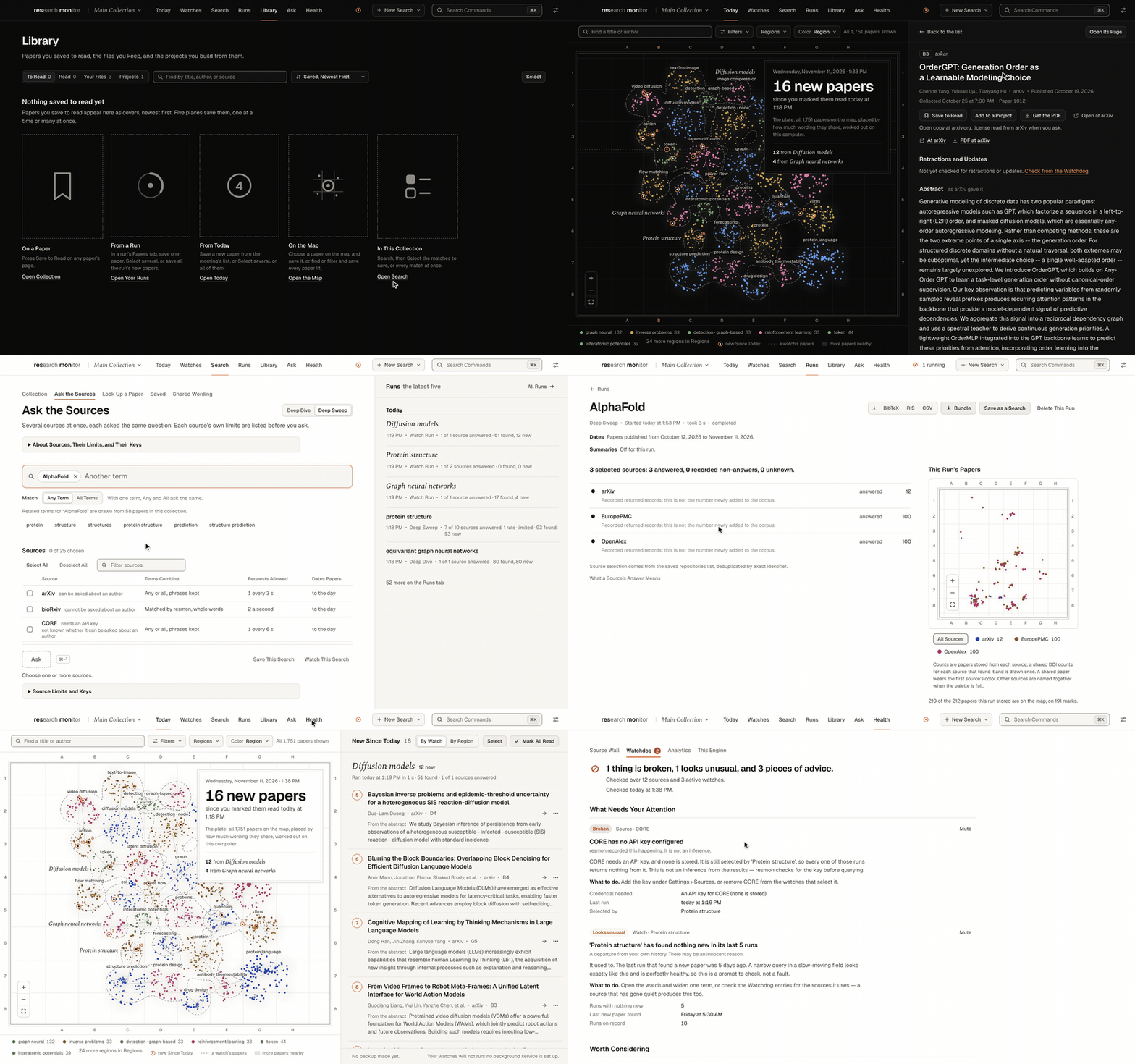
A loop from resmon’s tour, recorded with real searches of the public sources: Today’s map with the new papers ringed and numbered, a Deep Sweep asking several sources at once, and the Source Wall marking what each source did on each run.
Why I built it
These days, it seems like there’s a new frontier model released every week, and AI research has never been so exciting. What a time to be alive!
While it’s challenging (but fun!) to keep up with the state of the art, it’s also easy to let the science get ahead of you.
resmon is the open-source research monitor that makes staying current with your field as easy as reading a morning newspaper, so you can focus on what matters the most.
What else is out there
resmon isn’t the first tool for following new papers, and it borrows good ideas from several of them. Here’s how the ones researchers usually reach for compare, going by each tool’s own help pages and pricing pages as of November 2026:
| Tool | What it watches | Account and data | When a search breaks | Cost |
|---|---|---|---|---|
| Google Scholar alerts | Google Scholar’s own index: a search, an author, or citations to a paper, by email several times a week | Any email address works; a Google account manages them all | Not described. Scholar says it can’t guarantee uninterrupted coverage of any source. | No paid tier |
| arXiv email and RSS | arXiv only, by category rather than keyword, daily | No account; the list is arXiv’s | A status page for its RSS feeds | No paid tier |
| PubMed alerts | PubMed (and other NCBI databases): any saved query, by email daily, weekly, or monthly, or RSS | A free My NCBI account, on NCBI’s servers | Its help says an update may miss citations, and the next one will include them | Free |
| Semantic Scholar | Its own corpus: authors, papers, topics, and AI-recommended feeds, by email daily or weekly | An account and an online library | Not described | Free |
| Scopus and Web of Science | Their own indexes: saved searches and citations, by email | An institutional account | Scopus sends nothing when nothing is new. Web of Science will email you when nothing is new, if you ask it to. | Institutional subscription, with no public price |
| Feedly or Zotero feeds | Any RSS feed you find and paste in, such as a PubMed search’s | Feedly: an account, in its cloud. Zotero: your computer, with optional sync. | Not described | Feedly: free for up to 100 feeds, Pro $6 a month billed annually. Zotero: free. |
| ResearchRabbit and Litmaps | Their own catalogs, explored from seed papers and citations; Litmaps emails a map’s new matches | An account, on their servers | Not described | Free tiers; paid plans from $10 a month billed annually |
| Elicit Routines | Its own index, built from Semantic Scholar, PubMed, and OpenAlex and updated weekly; an AI agent runs your instructions daily or weekly | An account | An optional email when a run fails | Pro plans and up (Academic Pro is $39 a month billed annually), and each run draws on your plan’s usage |
| Scholar Inbox | New AI papers on arXiv and other open venues, ranked by a model you train | An account, on servers in Europe | Not described | Free |
| resmon | The open sources you choose, each asked directly, on demand or on your schedule | No account; a database on your computer | A record of what every source did on every run | Free and open source; AI on your own plan or key |
Each of these is the right tool for something. Google Scholar reaches well beyond the open sources, and PubMed’s alerts are free and take any query. Semantic Scholar’s feeds and Scholar Inbox’s ranking recommend papers you didn’t know to search for. If your library pays for Scopus or Web of Science, their alerts cover what those indexes cover.
But almost all of them watch one index: Google Scholar’s, arXiv’s, PubMed’s, or the vendor’s own merged catalog, which ResearchRabbit, Elicit, and Consensus each say they update weekly. arXiv’s own alerts follow categories, not keywords. A feed reader can mix sources, but only after you hunt down a feed for every search, one source at a time.
And about searches that quietly break, their pages say very little. Scopus sends no email at all when nothing is new, which is exactly when you’d want to know why. Web of Science and Elicit each go one step further, with an optional email for an empty result or a failed run. None of the pages I read describes a record of what each source did on each run. The clearest statement of the problem I found comes from a competitor: Consensus, an AI research engine whose docs list no alerts of its own, publishes a recipe for tracking new papers on a schedule with your own script, and its advice is to log the empty runs, too, to tell “no new evidence” from “the job silently broke three weeks ago.”
Almost all of them also keep your searches on their servers, behind an account, and the ones with AI run it inside their own service. resmon asks each source itself, keeps everything on your computer, and writes down what happened every time.
A quiet week, or a broken search?
This is resmon’s Source Wall from the demo collection the tour was recorded in, exported from the app unedited: three searches and three watch runs from November 11, 2026, each one asked of the public sources for real. Each column is a run, each row is a source, and each mark says what that source did on that run. Click or tap any mark to read resmon’s record of it.
Loading the Source Wall…
Three marks on the Deep Sweep for “protein structure” are worth a closer look. Semantic Scholar was asked, and it turned resmon away: HTTP 429, too many requests, after four attempts. In most tools, that run would simply come back with fewer papers. resmon marks it rate-limited, apart from both a failure and an empty answer, and when a source says how long to wait, resmon tells you when to try again. On the same run, DOAJ answered HTTP 502, and resmon marks that as a failure. On the Protein structure watch’s run, arXiv answered with nothing at all, and that’s an empty ring: a quiet day, not a broken search. A source that had nothing, a source that didn’t answer, and a source that asked you to slow down are different facts.
DBLP couldn’t be asked at all. It filters by publication year only, so it can’t answer a window shorter than a whole year, and resmon says so instead of quietly widening your search. A run’s outcomes and the wall both link to a page in the guide that explains what a source’s answer means, HTTP status codes included. The Watchdog, on the same Health screen, reads the wall for you: it reports sources that fail again and again, watches that are overdue, and departures from your own history, and it says what it can’t judge yet.
What’s new, on a map
Today is the first thing you see when you open resmon: your whole collection drawn as a map, which resmon calls the plate, with every paper collected since you last pressed Mark All Read ringed and numbered in the order it arrived. Papers that sit close together share wording, or meaning once an embedding model you’ve set up has read 90% of the collection, and each region is named by its most distinctive words. Neighboring regions get different colors, and a region list lets you sort, find, and filter them.
Here’s the plate from the same demo collection. Point at (or tap) any paper to see what it is, find a title or author, or zoom in with the buttons and drag to look around.
Loading the plate…
From the engine’s own map and Today, exported unedited from a collection built on November 11, 2026: three watches’ papers from arXiv, and three searches’ papers from the sources they asked. For the watches’ earlier papers, the day each was collected, and so how bright it’s drawn, is set from its publication date.
Papers fade as they age: the brightest were collected today, and the faintest six months ago or more. The dashed lines mark each watch’s papers. And “new” is a fact about your collection, not about the paper. A paper published years ago and found last night is new, while opening Today records nothing, so an accidental look doesn’t empty tomorrow’s list.
Every run gets a map of its own, too. It fills in while the run is going, as each source answers, colored by source.
Before you ask
Every source speaks its own dialect. In resmon, each term you type is one term (a phrase, if it has several words), and Match says how your terms combine: Any Term keeps a paper with any one of them, and All Terms keeps only a paper with every one. resmon then asks each source for exactly that, in that source’s dialect.
Most sources take a Boolean query. A few can’t be trusted with OR, so for Any, resmon asks them for each term in turn and merges the answers. Crossref and Semantic Scholar rank by relevance instead of filtering, so for All, resmon keeps only the papers with every term in the title or abstract. bioRxiv and medRxiv can’t be asked for words at all, so resmon reads what they list for your dates and matches your terms itself, as whole words: “ai” doesn’t match “said.” Some sources date papers to the day, and others only to the year. Some won’t answer at all without a free API key.
As you add a term, resmon offers up to six related terms, drawn from the papers in your own collection that use it. No outside service is asked.
resmon keeps a catalog of what each source does, and before you press Ask, it tells you what that means for this search. It doesn’t guess how many papers you’ll get. Try it with the catalog resmon ships; it starts with the sources of the Deep Sweep in the wall above.
Loading the catalog…
The notes are the ones resmon’s search form writes, worked out from the same catalog. In the app, the button starts the run.
The whole tour
Three minutes and 41 seconds, in nine chapters, recorded in the same demo collection with real searches of the public sources.
What else it does
- Look up one paper. Give Look Up a Paper a DOI, an arXiv id, a PMID, or a title, and resmon asks up to eight sources at once and shows what each one holds and how its copy matched. Get the PDF keeps a copy only when it carries a stated open license.
- Save from your browser. The Save to resmon extension for Chrome and other Chromium browsers adds a right-click item that opens Look Up a Paper with the paper you’re reading filled in. Nothing is looked up or saved until you say so.
- Watches for people, too. Follow a researcher’s new papers, or watch for retractions and corrections on their papers. Every match to a person says how it was made: by ORCID, by name and affiliation, or by name alone. Only the first is evidence of identity.
- Every run in one place. The Runs tab shows what’s running, what’s waiting for a free slot, and everything before, and a monitor in the top bar shows progress and failures. When one source is slow, Stop This Source stops it, and the run keeps what it returned.
- Search what you hold. Search a collection by words or by meaning, filter by source, category, author, and date, and export every match as BibTeX, RIS, or CSV. Select papers to save many to read at once, or move them to another collection. A coverage audit compares what a watch found with what you meant it to find, and a shared-wording scan finds abstracts that repeat each other word for word.
- Keep your reading. The Library is a gallery of the papers you’ve saved to read and copies of your PDF, TXT, MD, and TeX files, kept in a folder you choose, with a reader built in. Evidence projects let you pin exact passages and ask questions of the excerpts you pick, with every quote checked against the text. Ask About This Paper starts a conversation that can read the paper’s Library file, page by page.
- Reports, delivered. Every run writes a report as Markdown, HTML, and PDF, bundled with its references and its search record. Send it by email (with Gmail’s and iCloud Mail’s settings filled in), to a folder, to an Atom feed, or to a signed webhook, with a record of whether each one arrived.
- Windows and tabs. Open as many windows as you like, as tabs on a Mac, and right-click for what fits where you click. Web links open in resmon’s own browser, with Back, Forward, and an address field, or in your default browser if you’d rather.
- Back it up. Back up all of resmon to a folder you pick, such as the one Google Drive for desktop syncs, and restore it on another computer.
Install it
Download resmon 1.0.0 from the latest release. Each build carries its own Python runtime, so you don’t need Python, Node, or anything else installed first.
| Platform | File | Status |
|---|---|---|
| macOS, Apple Silicon | DMG | Tested: installed and used daily |
| macOS, Intel | DMG | Built and launched once by the release workflow’s check; not used daily |
| Windows (x64) | Installer (.exe) | Built and launched once by the release workflow’s check; not used daily |
| Linux (x64) | AppImage | Built and launched once by the release workflow’s check; not used daily |
So far, I’ve tested resmon only on Apple Silicon Macs. The other builds are made and launched by the same automated release check, but nobody has used them day to day yet. If something goes wrong on one of them, please open an issue with your system and what happened.
On a Mac, open the DMG and drag resmon to Applications. The builds aren’t signed, so the first time, macOS may say “resmon.app” is damaged and can’t be opened. It isn’t damaged; that’s how macOS refuses unsigned apps downloaded from the internet. Run this once, then open resmon normally:
xattr -dr com.apple.quarantine /Applications/resmon.appMacs don’t update themselves. To update, turn off Run resmon in the background, quit resmon, replace the app with the new one, run the command above again, and turn the background service back on. While the service runs, Finder can’t replace the app.
On Windows, run the installer, and if SmartScreen warns you, choose More info, then Run anyway. The reading queue works on Windows, but kept files and Evidence don’t; the rest of the app works. On Linux, mark the AppImage executable (chmod +x resmon-*.AppImage) and run it. The Windows and Linux builds update themselves.
For the browser extension, download the resmon-extension zip from the same release and unzip it. In Chrome, open chrome://extensions, turn on Developer mode, choose Load unpacked, and pick the folder. Edge, Brave, and other Chromium browsers load it the same way.
The install guide covers all of this, plus running from source.
Your first watch
You don’t need an AI plan or any keys to start: resmon searches every source that needs no key, with no AI at all.
- Ask once. Press ⌘D (Ctrl+D on Windows and Linux) for a Deep Dive into one source, or ⇧⌘D for a Deep Sweep across several. Type your terms, choose Any Term or All Terms, pick the sources and dates, and press Ask. The run opens on its own page, with each source’s recorded outcome, the papers, a map, and a report.
- Make it a watch. Press Watch This Search, and choose when it runs: every day, weekdays, weekly, monthly, or every few hours. By default, each run asks for the papers published since the previous one. Before you save, the What It Will Do panel restates your choices as sentences, warnings included.
- Turn on the background service. A resmon window doesn’t run your watches; the background service does, whether or not a window is open. Turn on Settings › In the Background › Run resmon in the background. Until you do, resmon tells you that your watches won’t run.
- Read Today. Tomorrow morning, open resmon and read what arrived. Press Mark All Read when you’re done.
The Quick Start walks through the same steps with every option, and ⌘K opens a command palette that goes anywhere in the app.
From a terminal, or another program
resmon ships with a resmon command. Choose Install “resmon” Command in PATH (in the resmon menu on a Mac, or the Help menu on Windows and Linux), then ask it what resmon has collected and how your watches are doing:
resmon today            # papers that arrived since you last marked all read, by watch
resmon collections      # every collection, with its papers and watches
resmon wall             # every source's answer to each recent run
resmon service status   # which resmon it reached, and whether your watches will run
Every command takes --json. The command never opens the database or starts resmon itself: it asks the running resmon, and with nothing running, it says where it looked and exits with status 3.
resmon also ships an MCP server, so an AI tool you already use can work with your collection through 26 tools: 19 that read, and 7 that change something, such as starting a search or creating a watch. Every tool says whether it needs a person’s approval, nothing destructive is exposed, and a watch created through a tool starts out inactive.
Inside the app, Ask is an assistant that answers from resmon through those same tools. When it wants to change something, it shows you the exact call with Allow and Deny, and nothing runs until you answer.
How it’s built
resmon is three parts that talk only over HTTP on your own computer: a Python engine, an Electron shell, and Atlas, the interface the shell shows. Here’s the stack, and why each piece is there:
| Piece | Built with | Why |
|---|---|---|
| Engine | Python, FastAPI, and httpx, bound to 127.0.0.1 | One engine owns the sources, the schedule, the reports, and every rule about what a result means. The window, the command line, and the MCP server all ask it, so they can’t disagree. |
| Data | SQLite, with sqlite-vec for search by meaning | Your collection is one file on your disk that any SQLite can read. Vectors are plain rows, and their index can always be rebuilt. |
| Scheduler | APScheduler, with its jobs in the database | Jobs survive restarts, and only the background service fires them, so exactly one process runs your watches. |
| Shell | Electron | One app for macOS, Windows, and Linux, with what only a desktop app can do: menus, windows and tabs, file pickers, notifications, the background service, and updates. |
| Interface (Atlas) | React and TypeScript, built with Vite, with TanStack Query | Most calls the window makes go through one typed client generated from the engine’s OpenAPI schema, so the interface and the engine agree on every route. |
| Reader | PDF.js and KaTeX | PDFs, Markdown, and TeX open inside the app, with the math drawn, and nothing in a file runs. |
| Reports | Markdown, a static HTML page, and LaTeX for the PDF | The HTML report has no scripts and reads on a phone. The PDF draws Greek, CJK, and the rest of Unicode, lists any character no font holds instead of dropping it, and comes with its LaTeX source. |
| Command line | Python’s standard library, and nothing else | It installs anywhere Python 3.10 runs, and it reads only what the running resmon reports. |
| MCP server | MCP over standard input and output | Another program gets the same tools as the assistant, with the same rules: approval before changes, and nothing destructive. |
| AI connections | The claude and codex commands, run as child processes, or a key for Anthropic, OpenAI, Google, xAI, DeepSeek, Alibaba, or Together AI, a local Ollama model, or any OpenAI-compatible endpoint | You use a plan you already pay for, or a key you already hold. resmon never sees your sign-in, and a key goes to the keychain and only to its provider. |
| Browser extension | A Manifest V3 extension for Chromium browsers | It asks for three permissions, reads a page only when you click its item, and sends nothing anywhere but to resmon. |
| Packaging | electron-builder, with a relocatable CPython from python-build-standalone | Installing resmon never means installing Python. |
A local server that checks who’s asking. Binding to 127.0.0.1 isn’t a boundary on its own, because any web page you open can send a request to your own computer. So every request to the engine needs a token minted when it starts, a loopback Host, and, from a browser, the exact origin of resmon’s own window. There’s no setting that turns this off.
Your AI, kept on a short leash. With Claude Code or Codex, resmon runs the command you installed and signed into; it never handles your sign-in itself. Summary calls run with the command’s tools switched off and its sandbox read-only, because abstracts are text from the internet, and a command can run things. A Codex conversation in Ask gets the read tools only, because codex exec has no way to hold a call for your approval.
How I tested it
GitHub Actions runs the tests on every pull request. On the last run over the 1.0 code, that was:
- 6,081 engine tests (pytest), passing on each of Python 3.10, 3.11, and 3.12, with 9 skipped. The 108 tests that ask the live public sources are left out of the default run.
- 1,517 interface tests (Jest), covering Atlas, the Electron shell, and the build scripts.
- Two suites that drive the real app with Playwright: 178 route checks on Linux, and 185 window checks on a real macOS window server, with 12 and 5 skipped.
Speed has a rule of its own. resmon’s performance harness measures the app against a recorded baseline, and no measurement may get more than 10% slower at the median, or 20% at the 95th percentile, without my sign-off. And before it publishes anything, the release workflow builds all four installers and launches each one against an isolated copy of resmon.
What it doesn’t do (yet)
- Tested only on Apple Silicon Macs, so far. The Intel Mac, Windows, and Linux builds pass the release check, but they haven’t been used day to day.
- Unsigned builds. The first launch on a Mac needs the one command above, and Macs don’t update themselves.
- Open sources only. resmon asks open scholarly sources. Google Scholar, Scopus, and Web of Science aren’t among them.
- Open-license PDFs only. Get the PDF downloads a copy only under a stated open license. For anything else, resmon opens the paper at its source.
- Watches need the background service. Without it, nothing runs on schedule, and resmon says so wherever it matters.
- PDF reports need LaTeX. Without XeLaTeX or LuaLaTeX on your computer, a run’s report comes as HTML and Markdown only.
- The extension isn’t in the Chrome Web Store. You load it yourself, as above.
- One computer at a time. There’s no phone app and no sync. A backup moves your collection to another computer.
- No kept files or Evidence on Windows, as above.