reword_nerd: Rewrite anything with the model you already use
Published
A browser workbench that hands your documents, projects, and images to the AI model you already use, in one paste
These days, there are some legitimate reasons for wanting to reword text or regenerate images with AI. For text, one might want to explore a different writing style, or to change the statistical structural word distribution. For images, perhaps the goal is to make precise edits to a picture, or to remove hidden pixel content. Regardless of why someone would try to do this, the process can be divided into human work and AI work: The human provides the context and instructions, and reviews the result from the model; and the AI does the hard rewording/regeneration work.
On the human side of this pipeline, there are two main challenges:
- Preparing and submitting everything to the model, i.e., context/prompt engineering.
- Evaluating the performance of the model and correcting its mistakes.
Challenge (2) depends on the specifics of the problem, the selected model, the chosen harness, and countless other variables. This process could be automated (e.g., LLM-as-judge), but doing so carries its own risks. Especially for important rewording or regeneration tasks, human review should still occur at some point.
But Challenge (1) is predictable: create prompt packages designed for a given model, and use them in the preferred harness. While this is straightforward in principle, it is tedious in practice.
reword_nerd solves that problem. And as of release 0.9, it makes Challenge (2) a lot easier, too.
Why I built it
Calling a language or image model is often the easiest part of a workflow. Preparing the source carefully is harder: deciding what belongs in context, checking what an extractor recovered, preserving the details that matter, and leaving behind a handoff that can still be understood after the browser tab is gone.
What would a prompt workflow look like if preparation, review, and export were treated as the product rather than hidden setup steps?
reword_nerd grew out of that question. I wanted the source, settings, warnings, prompts, and run instructions to stay visible long enough for a person to make deliberate choices. The result is not an automated rewriting or image-generation service. It is a browser workbench for preparing a handoff that can be used in a separate model interface.
The first versions did that job, but they asked a lot of the person using them. A finished package was a ZIP of prompts, runbooks, and offline workbooks, and getting it into a model still took several steps. So, for release 0.9, I rebuilt reword_nerd around a simpler goal: hand the job to the model you already use, in as few pastes as possible, and make it easy to check what comes back.
Most people who would use this already pay for ChatGPT, Claude, Gemini, or Grok, or already have a coding agent like Claude Code or Codex installed. They shouldn't need another subscription, another account, or an API key just to reword a document. And they shouldn't have to paste a project into a chat window one file at a time, either.
What reword_nerd does
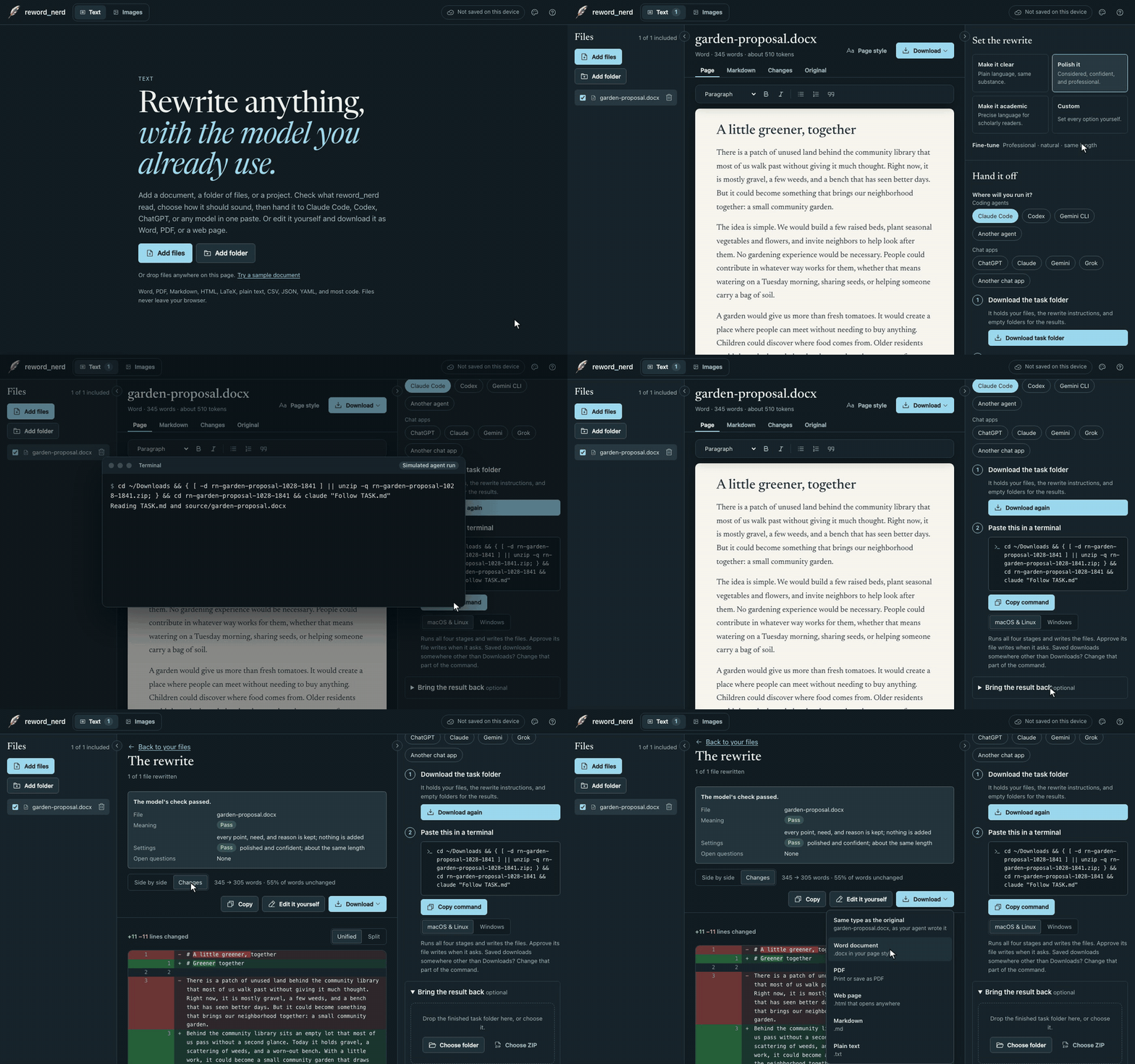
reword_nerd is one web page with two modes: Text for documents and projects, and Images for pictures. In both modes, the rhythm is the same:
- Add documents (Word, PDF, Markdown, HTML, LaTeX, plain text, CSV, JSON, YAML, and most code), a whole folder or ZIP project, or images. Scanned pages are read with OCR.
- Check the text that was read. Fix mistakes, accept text found in scanned pages, and choose which files take part.
- Set the goal, tone, length, and language. For images, say what should change and what must stay.
- Hand off to wherever the work will run: one command for a coding agent, one prompt for a chat app, or one prompt per image for an image tool.
There is no server and no account. Files are read on your device, and nothing leaves the browser unless you copy it or download it.
Hand it off in one paste
Where the work runs changes only the mechanics of the handoff, never the instructions themselves:
-
Coding agents (Claude Code, Codex, Gemini CLI): download a task folder and
paste one command. The agent reads
TASK.md, works through every stage, saves its notes along the way, and writes the result in the original format – Word files included. - Chat apps (ChatGPT, Claude, Gemini, Grok): copy one prompt. For long or delicate documents, Go step by step splits the job into four prompts. You paste each reply back into reword_nerd, and it goes into the next prompt for you.
- Image tools: more on those below.
Try it with the sample document below. Switch between Claude Code and ChatGPT, change the
goal, or flip the file to Word and watch the task folder gain a text/ copy for
the agent to read and a Word file to write.
The download button builds a real task folder. If you have Claude Code or Codex installed, you can unzip it and run the command yourself.
Decompose, Rewrite, Verify, Final
Every rewrite follows the same four stages, whether it runs in an agent or in a chat:
- Decompose: list every claim, fact, name, and constraint the rewrite must keep.
- Rewrite: write a new version in genuinely different words and structure.
- Verify: check for anything lost, added, or changed in meaning.
- Final: fix what the check found and finish the document.
The first and third stages make the model show its work. An agent saves each stage to its own file, so the reasoning stays inspectable after the run is over, and a chat reply ends with the model's own fidelity audit. It's a workbook for carrying the task into a model interface while keeping the reasoning process visible.
Whole folders and projects
Text accepts individual documents as well as whole folders and ZIP projects, so a project's
files go to the model together, with their paths. Before anything is read, reword_nerd
screens the project. Dependency folders, build output, lock files, and nested archives are
left out, the project's own .gitignore is applied, and files that look like they
hold passwords or keys are skipped and never kept.
In code, the instructions allow changes only to prose: documentation, comments, and user-facing strings. Code, identifiers, keys, paths, and numbers never change.
Here's a small sample project, screened by the same rules the app uses. Edit the YAML file, or add a file name, and see where it lands.
Bring it back, if you like
Handing off is only half of the job. The other half is Challenge (2): checking what the model did. So, reword_nerd lets you bring the result back. Paste the reply from a chat, or drop the agent's finished folder, and you'll see the rewrite side by side with the original or as changes in red and green, read the model's own check, and download the result in the original format.
The sample reply below was written by hand for this demo, in the format reword_nerd asks models to use. Read its last line closely: “extended” became “change,” and the model's own check still says PASS. A self-check is useful, but it doesn't replace reading the changes yourself.
Or reword it yourself
Sometimes, you don't want a model at all. You can edit the document right on the page, with headings, lists, bold, and italics, and Changes shows every edit the way a code review does (that's the My own edits option in the demo above).
Then pick a paper style (Paper, White, Sepia, or Night), a serif or sans typeface, and a size, and download the document as Word, PDF, a web page, Markdown, or plain text in that look.
Images
Images works the same way. Add pictures directly (PNG, JPEG, WebP, or AVIF), or add a Word file, PDF, folder, or ZIP, and reword_nerd pulls out the pictures inside it. Text in each picture is read locally with OCR, and you can correct it. Then say what should change and what must stay.
For Grok Imagine, ChatGPT, Gemini, or Midjourney, reword_nerd writes one prompt per image to paste beside the attached picture. An agent that can make images, like Codex, gets a folder and one command, and it does the whole set at once. The default goal is a faithful new rendition rather than a claim of pixel identity, and the site never sends that request to a provider itself.
How it compares
reword_nerd isn't the first tool in this space, and it doesn't replace most of the others. Here's where it fits. The prices and limits below are from each vendor's own pages as of October 31, 2026, and they change often.
Paraphrasers
QuillBot, Wordtune, Grammarly, DeepL Write, and LanguageTool are the obvious comparison. For a sentence or a paragraph, they're faster than anything else here: one step, several alternatives, done. But they run on their own servers, and their free tiers are small. QuillBot's free paraphraser takes 100 words at a time, Wordtune allows 10 rewrites a day, LanguageTool allows 3 rephrasings a day, and DeepL Write takes 1,500 characters without an account. Grammarly is the one that handles files well: its editor takes Word files up to 100,000 characters and gives them back in the same format.
reword_nerd has no cap of its own. The limit is whatever your model's plan allows.
AI inside the editor
Copilot in Word, Gemini in Google Docs, and Claude for Word edit the live document, and Claude for Word can use tracked changes. That's a real advantage: editing in place keeps formatting that a rebuilt file can't fully match. But each one ties you to one vendor and one plan, and each one lives inside its own editor, so a LaTeX project or a codebase is out of reach.
Prompt packers
Developers will recognize the task folder's cousins. Repomix, gitingest, files-to-prompt, and code2prompt pack a repository into one file for a model, and Repomix scans for secrets, too. repo2txt does it in a static page with no uploads, which is the closest design to reword_nerd's. But a packer's output is context, not a job. A task folder also tells the agent what to do, in what order, where to save each stage, and what to write back.
Converters
MarkItDown, Docling, and Pandoc turn documents into Markdown for a model, and they handle more formats and harder layouts than reword_nerd does. Pandoc even runs in the browser now. They convert, though; they don't rewrite, verify, or compare.
Image tools
ChatGPT, Gemini, Grok Imagine, and Midjourney can all edit an uploaded picture directly, and direct editing keeps a likeness better than a regeneration from a prompt. Tools like Midjourney's Describe and CLIP Interrogator go the other way, from a picture to a prompt. reword_nerd writes the instructions for a careful regeneration, keeps the picture's own text intact, and batches a whole folder for an agent.
So, what's different?
- Your files stay in your browser until you hand them off.
- It works with the model you already use, and the one you switch to next year.
- It makes the model show its work, with an inventory before the rewrite and a check after it.
- It brings the result back for a line-by-line review and a download in the original format.
- It takes documents, scans, projects, and images in one place.
If you only need to polish a sentence, a paraphraser is faster. For a long document, a whole project, or a folder of images, that's what reword_nerd is for.
Privacy and limits
reword_nerd is a static web page. Files are read on your device, and nothing is sent anywhere unless you copy it or download it. Saving your workspace between visits is off until you turn it on, and then it stays in your browser. You can export the workspace as a ZIP at any time.
That boundary covers reword_nerd itself. Once you hand a job off, your text goes to the model you chose, under that company's terms.
Local processing does not make extraction infallible. Documents, OCR, source images, and generated prompts still require human review. Image-model output is stochastic, and faces, visible text, logos, fine geometry, and structured layouts can drift. A rebuilt Word or PDF file keeps headings, lists, tables, and emphasis, but not every detail of the original layout. And exact image bytes may contain EXIF or location metadata, so review what you hand off before you share it.
Use it
Open reword_nerd in any modern browser. There's nothing to install and no account to make. Choose Rewrite text or Regenerate images, or start with Try a sample document.
To hand off to a coding agent, you'll need that agent installed and signed in: Claude Code, Codex, or Gemini CLI. reword_nerd gives you the command, and the agent asks before it writes files. For chat apps and image tools, the account you already have is enough. (One exception: as of October 31, 2026, Grok's plans page lists Grok Imagine only on paid plans.)
reword_nerd is open source under the MIT license. To run it locally, you'll need Node.js 22 or later:
git clone https://github.com/ryanjosephkamp/reword-nerd.git
cd reword-nerd
npm install
npm run dev
Updates are written up on the Updates page, which has an RSS feed. Bugs and ideas go to GitHub issues.