feature release
reword-nerd v0.8: Image prompt packages
At a glance
v0.8 adds an orange Image companion beside the established Text workbench. Images remain in the browser while the new workflow prepares one reference-image prompt and provider run card per included source, with focused improvements to document review and both package formats.
Added
- Added a distinct Image portal with the same Night Terminal structure, an orange visual system, separate local preferences, and a dedicated synthetic Quick Start.
- Added safe local intake for supported image files, folders, bounded ZIPs, and recoverable PDF or DOCX visuals, with signature, path, size, dimension, and archive checks before admission.
- Added per-image settings, masked bulk configuration, separate focus and selection controls, inclusion review, and a confirmation boundary that invalidates stale builds after a source or configuration change.
- Added optional local OCR review whose accepted text can enter a prompt only after review, while unaccepted OCR stays outside the generated package.
- Added deterministic packages containing one source-and-prompt pair per included image, provider-specific run cards, manifests, responsive Night Terminal HTML workbooks, and bounded self-contained HTML when size permits.
Changed
- Changed Text package companions to use the same polished Night Terminal HTML exports as Image packages while retaining the Text portal's teal accent and schema-6 package contract.
- Changed PDF source review to include a Continuous PDF view for natural scrolling and a Gallery for direct page selection, while retaining focused-page zoom controls.
- Changed Image cards so the full card can focus its source, improved long package hashes and metadata containment, and kept bulk selection independent from focused-image navigation.
- Changed both Text and Image exports to use timestamped ZIP downloads that remain explicit, local actions after an in-memory build.
Fixed
- Fixed accessible visual refinements across the Image portal, including orange portal identity and dialog borders, readable settings menus, persistent link colors, clear build controls, centered dialog close icons, keyboard-visible focus, and compact mobile containment.
- Fixed selectable-text containment in Continuous document review so extracted text remains inside its own page panel instead of overlapping the following source page.
- Fixed stale package and preview custody so a changed image-set revision discards both together before another build.
Why this matters
Reference-image prompting benefits from the same inspectable preparation that already supports text rewriting. Source custody, model-specific instructions, requested changes, warnings, and export hashes stay visible, while repeated settings can be applied across a selected group without losing the ability to refine one image at a time.
See it in action
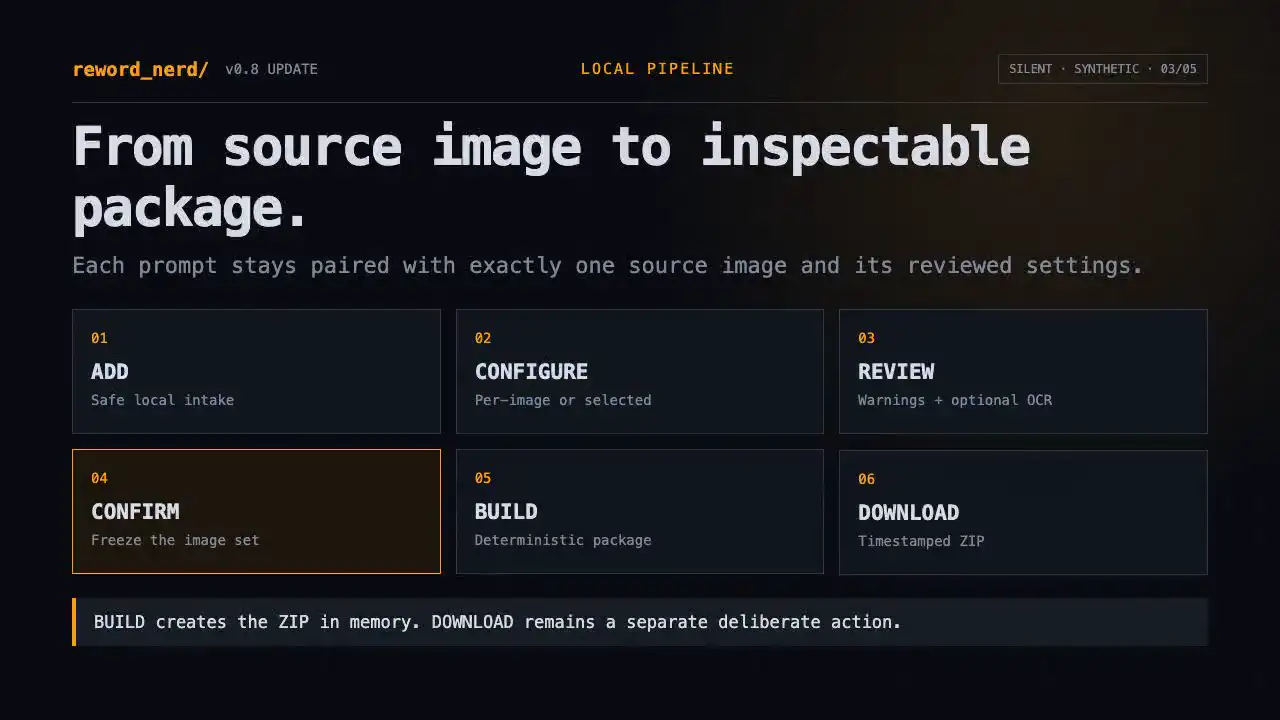
The Image portal includes its own silent Quick Start for the complete working flow. The separate silent, synthetic v0.8 walkthrough embedded with this post highlights the companion portal and the broader polish without substituting for that tutorial.
How to use it
Choose Image in the header, add supported images or a folder, focus and review each source, and select any group that should share explicit settings. Review warnings and optional OCR, confirm the image set, then build the package in memory. Inspect the package preview before deliberately downloading the timestamped ZIP. Use Text for document rewriting, including Continuous or Gallery PDF review when a source has multiple pages.
Compatibility and limitations
The Image portal accepts PNG, JPEG, WebP, and AVIF directly and recovers supported visuals from bounded PDF, DOCX, folder, and ZIP inputs. Unsupported encodings, nested archives, links, encrypted containers, unsafe paths, and limit violations are rejected with local messages. Image-generation output remains stochastic; faces, visible text, logos, fine geometry, and structured layouts require human review. Midjourney guidance is best-effort variation, and provider capabilities can change after a profile's recorded verification date.
Privacy
Images, extracted visuals, OCR, filenames, settings, prompts, and packages remain in the active browser session. No model is called, no credential is requested, no provider charge is incurred, and no selected source is uploaded by reword-nerd. Exact source-byte preservation may retain EXIF or location metadata inside exported images, so packages should be reviewed before sharing. Public tutorial and Updates media use synthetic same-origin assets and remain separate from session content.
Verification
Verification covers Image intake signatures and limits, archive safety, reducer and confirmation revision behavior, prompt profiles, deterministic package bytes and hashes, clipboard and drag fallbacks, object-URL disposal, Text fixture parity, static Updates rendering, responsive containment, accessibility, privacy, and direct Pages-base routes. Chromium coverage is recorded without claiming unrun cross-browser behavior.
What comes next
Post-release verification remains distinct from future marketing media and external writing. Those materials remain independent later work rather than part of the product package.
Feedback and contribution links
Video unavailable? Open the release poster.