grooph: a whiteboard for AI agent workflows
Published
grooph = loop + graph
It still blows my mind that I can just ask an agent to build me a Mermaid diagram, and it actually works. In the summer of 2026, after seeing the successes of creators like Matt Shumer, who used his so-called Gauntlet Loop to get Opus 5 to build a premium browser FPS game (Claude of Duty) in one shot (from a single prompt), I wondered if anyone had made a programmable "design language" like Mermaid, but for agent/subagent loop-graph workflow diagrams.
From what I could tell, nobody had. So, I did it.
grooph draws workflow diagrams for AI agents and the people who work with them: who does the work, who checks it, where a person decides, and when it all stops. You can draw one yourself, ask an agent to draw it, or take turns.
Each diagram is a single small JSON file that a person and an agent can both read and write.
There are already plenty of ways to draw a flowchart, and plenty of platforms that build and run agents. grooph is neither:
- It draws, and it never runs anything. grooph never starts an agent or calls a model, so a diagram works with Claude Code, with Codex, in a chat app, or for a team of people. Nothing you draw leaves your device.
- It checks the loops. Every loop has to say how it stops: a round limit, a budget, a passing check, or a person’s approval. A loop that would run “until it’s perfect” is flagged before anyone starts it.
- It’s made for a phone. The app opens in a browser, needs no account, and works offline once it’s been opened. A link opens the same diagram on any device.
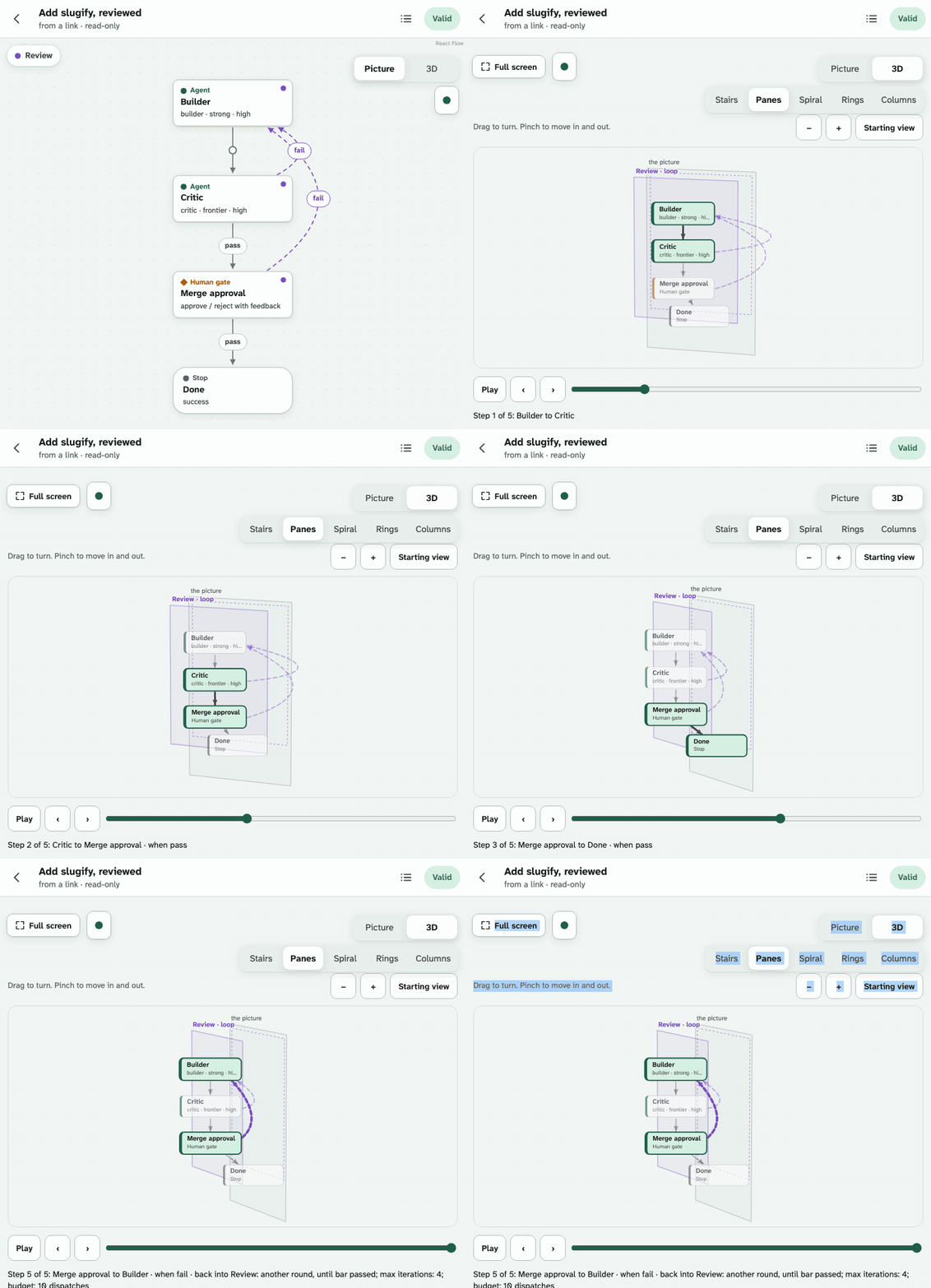
- It’s 2D and 3D. The flat picture reads like a flowchart, and five 3D views show each loop as something you can turn and step through, one edge at a time.
Why I built it
Most useful work with AI agents is a loop of some kind. One agent makes a change, another checks it, and the change goes back until it passes – or until somebody decides it’s good enough. Add a test suite, a second reviewer, or a person who has to approve a merge, and the loop gets hard to hold in your head, let alone explain to someone else.
The usual way to describe these loops is a long prompt, and a long prompt is a bad diagram. You can’t see what drives the system, and you can’t see what stops it. That second part matters more than it sounds: a loop with no limit is a loop that can keep spending your money all night. I wanted to draw the loop, see it, and have something tell me when I’d forgotten the way out.
grooph is primarily a design language and a workflow drawing tool for humans and agents, not a bundle of hooks and skills to force a model to follow a graph that you've designed.
If you want to enforce a specific structure in your chosen harness, you can install the grooph npm package, which turns a diagram into a set of instructions that actually direct the work of your agents.
However, if you do choose that route, note that it might add friction and inefficiencies to your workflow.
I conducted a couple of empirical studies to compare the grooph package to the traditional prompt alternative (as Matt Shumer used in the Gauntlet Loop example), and the results suggest that, at least for the relatively small and short examples being tested, the package didn’t beat the same design written as a plain prompt. What did help, in both forms, was a reviewer who held evidence the builder couldn’t see.
In the first study (27 runs), the package scored the same as plain instructions on held-out checks, cost up to twice as much, and came last in three of four projects with a blind judge.
In the second (24 runs), the same instructions written as prose did just as well but were cheaper, and the package took two to eight times as many turns.
So, grooph dropped the directing and kept the drawing: what the experiments found has the numbers and the data.
What’s already out there
The tools near grooph fall into three groups, and each one does something grooph doesn’t try to do.
- Visual agent builders such as OpenAI’s Agent Builder, n8n, Flowise, and Langflow let you lay out agents on a canvas and then run them there. The diagram is the program, so it lives on the platform that runs it.
- Framework tools such as LangGraph Studio draw the graph of an app built with that framework and step through it as it runs.
- Diagram tools such as Mermaid, draw.io, and Excalidraw draw anything at all. Mermaid even added an agentflow diagram type in version 12, still in beta. But a general diagram doesn’t know that a loop needs a way out, or that one box is a person’s approval and not another step.
grooph sits between them. It has the vocabulary of the agent platforms – builders, critics, checks, human gates, stops, and the brakes on every loop – with the portability of a diagram. It runs nothing, it belongs to no framework, and it reads and writes Mermaid, both flowcharts and agentflows, so a grooph diagram goes anywhere Mermaid does.
Try it right here
These are eight of grooph’s twenty templates, drawn in this page by grooph’s own drawing script. Pick a workflow, then a view and a look. Each 3D view shows the loops differently: as stairs you climb a round at a time, as panes stacked toward you, as a spiral, as rings, or as columns.
This demo needs JavaScript. You can open the templates in the app instead.
And this is the app itself, in a frame, holding the Review gate template as a graph. Tap 3D at its top right, then turn the diagram and step through its first pass, one edge at a time.
One small document
Everything in a grooph diagram comes from one JSON document: its nodes, its edges, its loops, and the stops on each loop. That’s what makes it work with agents. An agent writes the document, grooph checks it, and you look at the picture instead of the JSON. You can also edit the document directly – try it below.
This demo needs JavaScript.
Loops that know when to stop
grooph’s checker reads a diagram the way a careful reviewer would. It has more than thirty rules, each with a code, an example that breaks it, and a sentence on how to fix it. The ones that matter most are about loops and the people in them:
- A loop needs a stop. A round limit (“at most 4 rounds”), a budget (“30 minutes,” “10 dispatches”), a bar to pass, or a person’s approval. A loop with only a round limit gets a warning too, because a round limit is a backstop, not a definition of done.
- A critic needs a bar. A loop that a critic judges has to say what passing means, such as a checklist or a test, so the critic doesn’t invent a new standard every round. A critic also gets the work’s evidence, not the builder’s whole context, and grooph suggests a different model for it, since a second opinion from the same model tends to make the same mistakes.
- Irreversible steps go through a person. A step marked irreversible, such as publishing or merging, can’t be reached on any path that skips a person’s decision. A human gate is drawn as a trapezoid, so you can see exactly where you’ll be asked.
The app checks as you draw, and its badge says how many issues are left. The command line checks the same way, with the same codes, and the rules page lists every one.
Draw it your way
- By hand, in the editor, on a phone or a computer: add agents, checks, gates, and stops, connect them, and draw loops with their stops. Or start from one of the twenty templates, or from one of four plans for people to follow.
- With an agent. In Claude Code, the
grooph-designskill proposes one to three diagrams for the work you describe, with a link that compares them side by side on your phone. A chat app can draw with grooph too, and the app’s Paste a document opens whatever the chat gives you. - From Mermaid. Paste a Mermaid flowchart or agentflow, and grooph opens it as a diagram, listing everything it had to guess.
- By sketching. Every diagram has a third view, Sketch, beside the picture and 3D. Draw the workflow with a pen, a finger, or a mouse – the drawing page is from mermaidify, my sketch-to-Mermaid tool, with all its bells and whistles – and press Make it a graph. A box represents an agent, a diamond is a critic, a trapezoid a person’s approval, and arrows that come back around are a loop. Redraw a diagram you already have, and every step keeps what a drawing can’t say, like its brief and its model.
Share it
A diagram leaves grooph in whatever form the next person needs: a link that opens it in the app on any device, an embed for a web page, an SVG or PNG picture, a one-file offline page, Mermaid text, or a PLAN.md for people to follow. A link carries the whole document inside it, compressed, after the #, so opening one sends your diagram to no server. The pictures in this post come from grooph’s script for web pages: one script tag draws a diagram inline as SVG, with nothing fetched.
Use it
Open ryanjosephkamp.github.io/grooph. There’s nothing to install and no account, and your diagrams stay in your browser. For the command line, you need Node 22 or later:
npm install --global grooph
grooph template use review-gate --name "Ship the fix" --out fix.grooph.json
grooph validate fix.grooph.json
grooph image fix.grooph.json --out fix.png
grooph share fix.grooph.json
Most commands end with a next: line that says what to run after them. The quickstart covers the app, the command line, and drawing with an agent.
How it’s built
grooph is TypeScript from end to end, in one repository with four parts that share a core. The choices below all come from the same two goals: it should be fast on an ordinary phone, and nothing should leave your device unless you send it.
- A core with no dependencies. The document’s schema, the checker, the layout, the pictures, and Mermaid in and out live in one package that depends on nothing. The same code runs in the app, the command line, the MCP server, and the script for web pages, so a diagram checks and draws the same everywhere.
- The app: React and React Flow, built with Vite. React Flow handles the editable canvas, which is the hard part of a diagram editor on a touch screen. Everything else loads only when it’s used – the 3D views, export, Mermaid import, the Sketch view – so the first load is about 163 KB, compressed, and a check fails the build when it grows past its budget.
- Offline by default. The app is a progressive web app: a service worker keeps every file it needs, and your diagrams live in the browser’s own database. A share link puts the whole document, compressed with fflate, after the
#of the address, the part a browser never sends to a server. - Pictures drawn by grooph itself. The flat picture is SVG from grooph’s own layout, and it’s deterministic: the same document and theme give the same bytes, so the tests can compare pictures exactly. The 3D views use no WebGL and no 3D library. A small projection draws each scene on a 2D canvas, with the cards as real page elements on top, so the text stays sharp and an older phone keeps up.
- Drawing by hand: mermaidify’s page. The Sketch view is the drawing page of mermaidify, brought in whole and pinned to one of its releases by checksum, so a test fails if the copy ever drifts. Its reader finds shapes and arrows in the strokes themselves, with geometry and no model, in a few milliseconds. grooph reads what it found as Mermaid, through the same reader that opens pasted Mermaid, and remembers which strokes drew which step, which is how a redrawn diagram keeps every step’s details.
- A command line in one file. The
groophcommand is a single bundled script for Node 22 or later, with the checker, the pictures, share links, and an MCP server that gives an agent grooph’s drawing tools. - Tested like a product. About 1,970 automated tests, about 390 of them in a real browser at phone size, plus checks for the performance budgets, the docs, and the version number. The Mermaid grooph writes is also read back by a second, independent Mermaid reader, Pele, to catch anything another tool would choke on.
- Hosted on GitHub Pages, and released under the MIT license.
What it doesn’t do
grooph doesn’t run your agents, and it doesn’t make them better on its own; the experiments above say as much. It’s a way to plan a workflow, check it, and show it to someone. A few parts are marked experimental in the app and the docs, because they work and are tested but may change: watching a live session draw itself, the MCP server, the Sketch view, and the lab that keeps the old compiler.