Free Chrome extension · Development build
Capture the trail. Keep the source.
Drag across any part of a webpage to collect its links. Each one keeps its real anchor text, its exact URL and the page it came from, ready for a spreadsheet, a document or your bookmarks.
- Free forever
- No account
- No tracking
- Stays in your browser
journal.example.org/reading-lists/uhi
Reading list: urban heat islands
Drag across the list
Anchor text and URL, kept in separate columns
| Anchor text | URL |
|---|
Press and drag over the reading list to select links, the way the extension does on a real page.
Watch it on a real page
About a minute on the practice page: select a region, save it, check the separate fields, group by URL and export a workbook, then capture the links inside a PDF. Recorded with version 1.0.0.
Read the transcript
- 0:00
Picture The Link Meteor artwork: a glowing lime meteor beside the name.
- 0:03
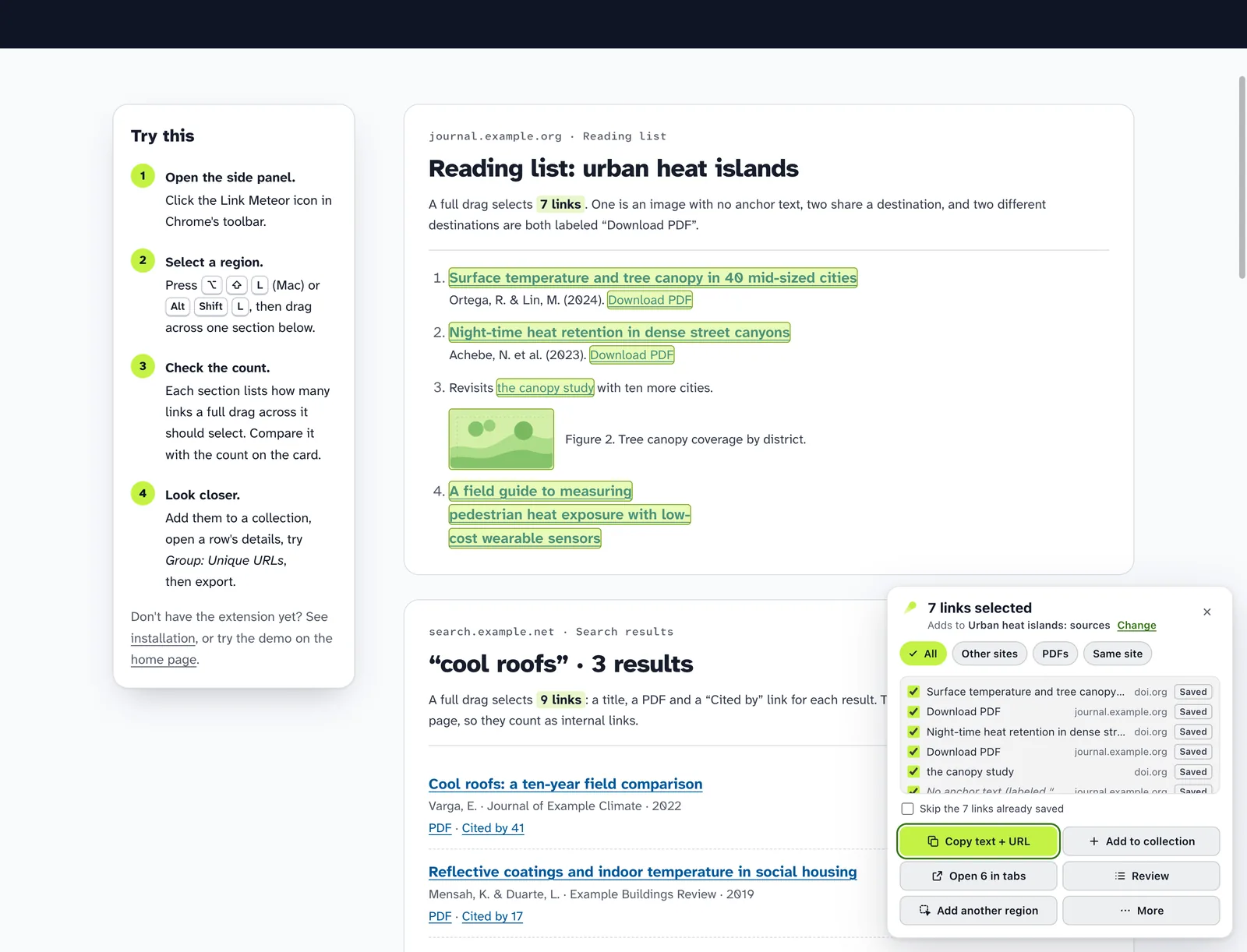
Picture On the practice page, the reading list is selected with a drag. Seven links are highlighted, and a card reads “7 links selected” and “Adds to Urban heat islands: sources.” Add to collection saves them.
- 0:03
Press the shortcut on any page to select a region.
- 0:07
Drag across the links you want. Each match lights up.
- 0:11
7 links selected, and the card says where they’ll go.
- 0:13
Add them to a collection, or copy two columns right away.
- 0:16
Picture The full view lists the seven links, each with its anchor text, URL and source page on lines of their own. The image link shows “No anchor text” with its accessible label. Grouping by URL shows one link twice, also labeled “the canopy study”, and its details show each occurrence with its own anchor text and source page. Removing the grouping restores all seven rows, and Download Excel file saves a workbook.
- 0:16
Anchor text, URL and source page stay in separate fields.
- 0:20
An image link keeps empty anchor text. Its alt text is kept as a separate label.
- 0:24
Group by URL when you want. Every label stays visible.
- 0:31
Open a group to see each occurrence and where it came from.
- 0:38
Switch back any time. All 7 occurrences are still there.
- 0:43
Download Excel, CSV, JSON, BibTeX and more.
- 0:45
Picture The downloaded workbook has a header row and seven rows of anchor text and URL; the image link’s anchor text cell is empty.
- 0:45
Two clean columns: anchor text and URL.
- 0:48
The image link’s anchor text stays empty. Nothing is invented.
- 0:51
Picture Beside a PDF of the reading list’s first paper, the Link Meteor side panel offers Capture this PDF. Its preview, “Links in this PDF,” shows the DOI and title read from the PDF and six links with their page, anchor text and address. Add 6 links saves them, and a notice reads “Added 6 links and the PDF itself to Urban heat islands: sources.”
- 0:51
New in 1.0: on a PDF’s tab, Link Meteor reads the links inside the PDF.
- 0:55
A preview shows every link with its page. Nothing is saved yet.
- 1:00
Add them in one step, with the PDF itself as a link.
- 1:05
Picture Closing card: free forever, no account, no tracking, stays in your browser. The website address and “Made by Ryan Kamp.”
Two fields. Never merged.
Most link tools flatten a link into one string, or swap its label for the destination's title. Link Meteor keeps exactly what the page showed, and exactly where it pointed.
What Link Meteor saves
- Anchor text
- Download PDF
- URL
- https://journal.example.org/articles/uhi-2024-0142.pdf
- Original href
- /articles/uhi-2024-0142.pdf
- Source page
- Reading list: urban heat islands
journal.example.org/reading-lists/uhi - Captured
- Sep 25, 2026, 2:12 PM · with its capture batch
- Your notes
- Notes and tags you add, kept apart from what was captured
-
A label is what the link says
“Download PDF” stays “Download PDF”. It is never replaced by the destination's title, and Link Meteor never visits the destination to look one up.
-
Empty stays empty
An image-only link has no anchor text, so that field is left empty. Its alt text or ARIA label is saved in a separate, clearly named field.
-
Duplicates are kept
The same URL linked twice with different labels is two occurrences. Group by URL when you want to, ungroup any time; nothing is merged or thrown away.
From one paragraph to every open tab
Choose exactly how much to collect. Link Meteor shows the scope before it captures, and asks Chrome for access only when a feature needs it.
-
A region
Press ⌥ ⇧ L on a Mac or Alt Shift L on Windows and Linux, then drag. Matching links light up with a live count. Scroll while dragging to reach more, or add another region.
Uses temporary access to the page you invoke it on.
-
Hold a key and drag
Hold a letter, or Command on a Mac and Ctrl elsewhere, and drag without opening Link Meteor first. Typing in a text field never triggers it.
Optional. Allow all sites once, with sites to skip, or one site at a time; stops if you remove access.
-
This page
Every loaded link on the page, including links inside closed components and frames. Tick Scroll to the end first for pages that load more as you scroll, or Follow Next to capture up to 20 pages in a row.
Uses temporary access to the page you invoke it on. Frames from other sites need those sites' access, asked for by name.
-
A PDF
On a PDF's tab, Capture this PDF reads the links inside it, each with the words under it and its page, and shows them before anything is saved. Or import a PDF file.
Uses temporary access to the PDF's tab. A PDF file from your computer needs none.
-
Tabs you pick
Choose exact open tabs from a list grouped by window. Tabs opened after you start are left out.
Optional. Asks to see your tab list, and for access to the sites you pick.
-
The pages behind links
Select up to 20 saved links, and Capture their pages… opens each one in a background tab, one at a time, captures it and closes it. It goes one level deep and never follows the links it finds.
Optional. Asks for access to those sites by name, in one click.
-
This window, or all windows
Every ordinary tab, up to 100 per capture, each with its own result. Browser pages, the Chrome Web Store and incognito windows are left out and named as such.
Optional. Same tab-list and site access requests as picked tabs.
-
Or the tabs themselves
Save each tab as one link, with its title, instead of the links inside it: this tab, tabs you pick, or whole windows. Right-click the toolbar icon to save every tab in the window.
Optional. Asks to see your tab list; no site access needed.
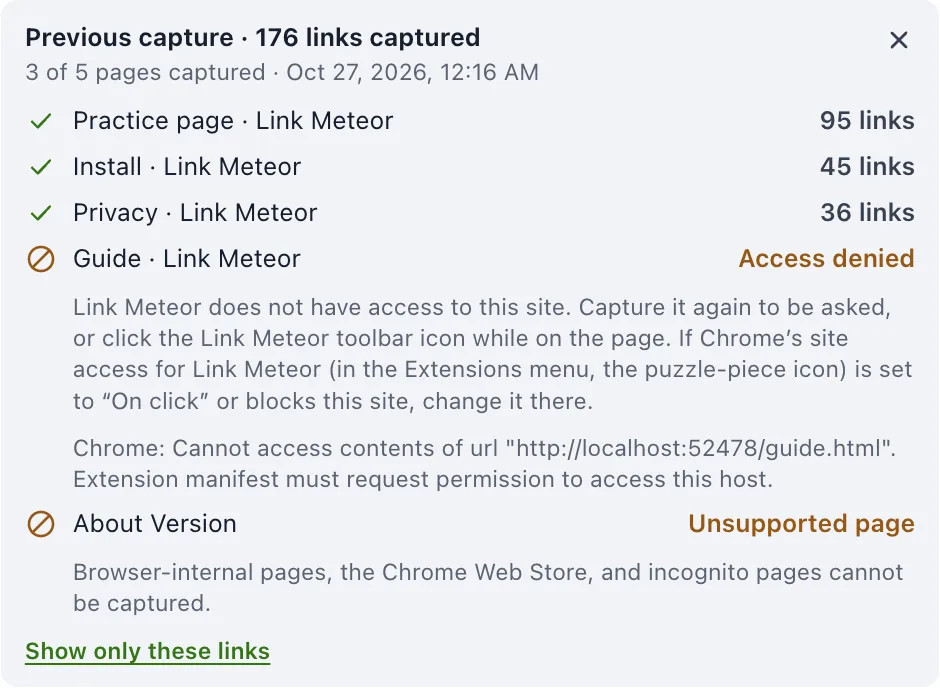
When a page can't be read, it says so
A multi-tab capture reports every page separately, and so does a capture that goes from page to page. A page with no links is not the same as a page Link Meteor wasn't allowed to read, and it never pretends otherwise.
- CapturedWith the exact count, plus any coverage notes, such as frames from sites it has no access to, with Allow these sites to include them.
- No linksThe page loaded and genuinely has no links it can read.
- Access denied or unsupportedSite access was declined, or Chrome doesn't allow extensions there.
- FailedThe tab closed or changed during capture. Everything that succeeded is still kept.
Curate without losing anything
Captures land in named collections saved on your computer. Review them beside the page in Chrome's side panel, or open the full view in a tab.
- Search anchor text, URLs, source pages, the words around each link, notes and tags.
- Filter by domain, file type, or links that stay on the source site.
- Group by URL to see every label and page that points to it, then switch back.
- Open any link to see its full provenance and add notes and tags.
- Add your own columns, such as a deadline or a contact, and fill one in for many links at once.
- Mark links Unread, Reading or Read, star the ones that matter, and see a collection at a glance in Insights.
- Keep the citation details pages and PDFs give about themselves, and the DOI or arXiv ID in a link's address.
- Fill in a paper's missing authors, date and journal with Page details lookup, off unless you turn it on. It sends only the DOI, arXiv ID or PubMed ID.
- Move or copy links between collections, and import them from spreadsheets, PDFs, bookmarks or pasted text.
- Download the files behind links, such as PDFs and images, named after their anchor text, or their address when the text just says “PDF”.
- Get the PDFs behind chosen links as one ZIP, or combine them into one PDF in the order you choose.
- Remove what you don't need, with undo that restores the original order.
Take it anywhere
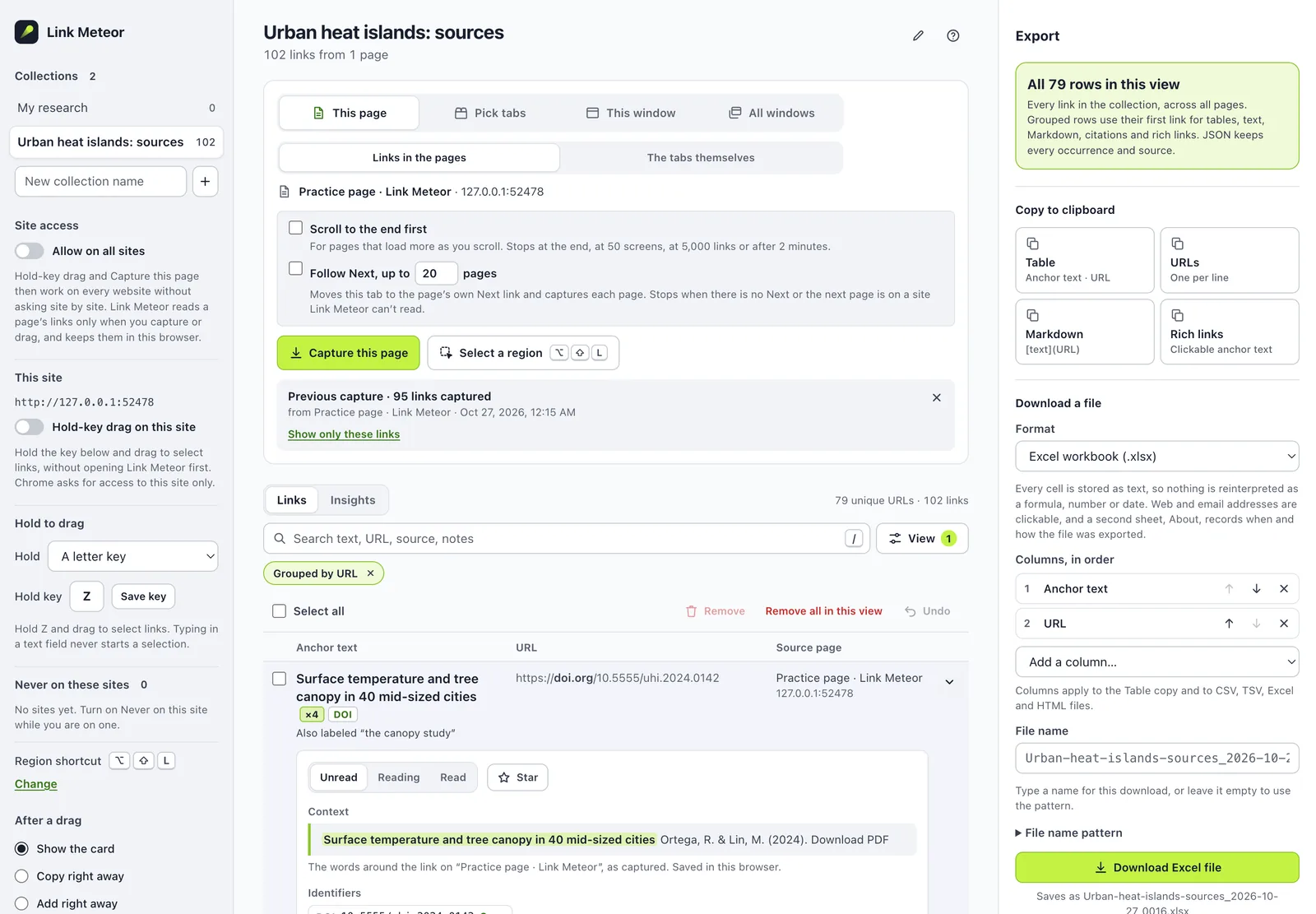
Copy two clean columns straight into a spreadsheet, or download a file. Choose which fields to include and in what order. This preview uses the extension's own export code on the links you selected in the demo above.
Excel workbook
Every cell is stored as text, so nothing is reinterpreted as a formula, number or date.
- Excel .xlsx
- CSV
- TSV
- Markdown links
- HTML table
- JSON with full provenance
- BibTeX, RIS and CSL-JSON
- Annotated bibliography
- Obsidian note
- URL list
- Clipboard
- Rich links for Docs, Word or Notion
- Chrome bookmark folder, new or existing
- Open up to 500 in tabs, a window or a tab group
- The linked files themselves
- Their PDFs as one ZIP or one PDF
Private by construction
Link Meteor has no server to send anything to. Your collections are stored by Chrome on your computer, and the extension's security policy forbids its pages from making network requests. It visits a site only when you ask it to: to open a link, download a file, read a PDF or capture pages. One optional feature, Page details lookup, sends a paper's DOI, arXiv ID or PubMed ID to Crossref, DataCite or NCBI, and only after you turn it on and click.
- No accountNothing to sign up for, nothing to sign in to.
- No serversNo backend, no sync service, no cloud copy.
- No trackingNo analytics, telemetry or ads, in the extension or on this site.
- No paid tierEvery feature is free, with no limits to unlock.
What it doesn't do, yet
Plain limits, so you know what to expect before you rely on it.
- No crawlingIt scrolls, follows Next or opens chosen pages only when you start it, and stops at a stated limit: 50 screens, or 20 pages. It goes one level deep and never follows the links it finds.
- Frames need their site's accessA frame from another site is read only where Link Meteor has access to that site. The report names those sites, and a region can't reach into them.
- Only real linksIn a PDF, scanned pages are pictures, and an address printed without a link isn't picked up. PDFs are read up to 50 MB and 2,000 pages. JavaScript-only buttons without a real link aren't links.
- Desktop Chrome only, for nowThere's no Firefox, Safari or mobile version. Chrome's own pages, the Web Store and incognito are off limits.
- Nothing looked up unless you askAuthors, dates and DOIs come from what pages and PDFs say about themselves, or from a link's address. Page details lookup fills in the rest only after you turn it on and click Look up details.
- No cloud copyCollections live in this browser profile. Download a backup file to keep a copy or move them to another computer.
Try the development build
Link Meteor isn't in the Chrome Web Store yet. You can load the current build into desktop Chrome yourself in a couple of minutes, then practice on a page made for it.